10 AI models for legal research — elements of claims, standards of review, circuit splits, and case-specific analysis
Research the elements of a negligence per se claim in Ohio, find the standard of review for a motion to compel under Rule 37, compare how the Sixth and Seventh Circuits apply proportionality under Rule 26(b)(1), or inject your complaint and ask "what affirmative defenses will the defendant raise under Rule 8(c)?" 10 AI models in one interface — GPT, Claude, Gemini, Perplexity, and AI.Law’s legal model — with a saved research library and nearly two dozen ready-made prompts built for litigation.
First available on Core (Understand), from $99 per month for the firm. See pricing
Open Your Free Plan · Book a Demo
How Legal Research works on a live matter
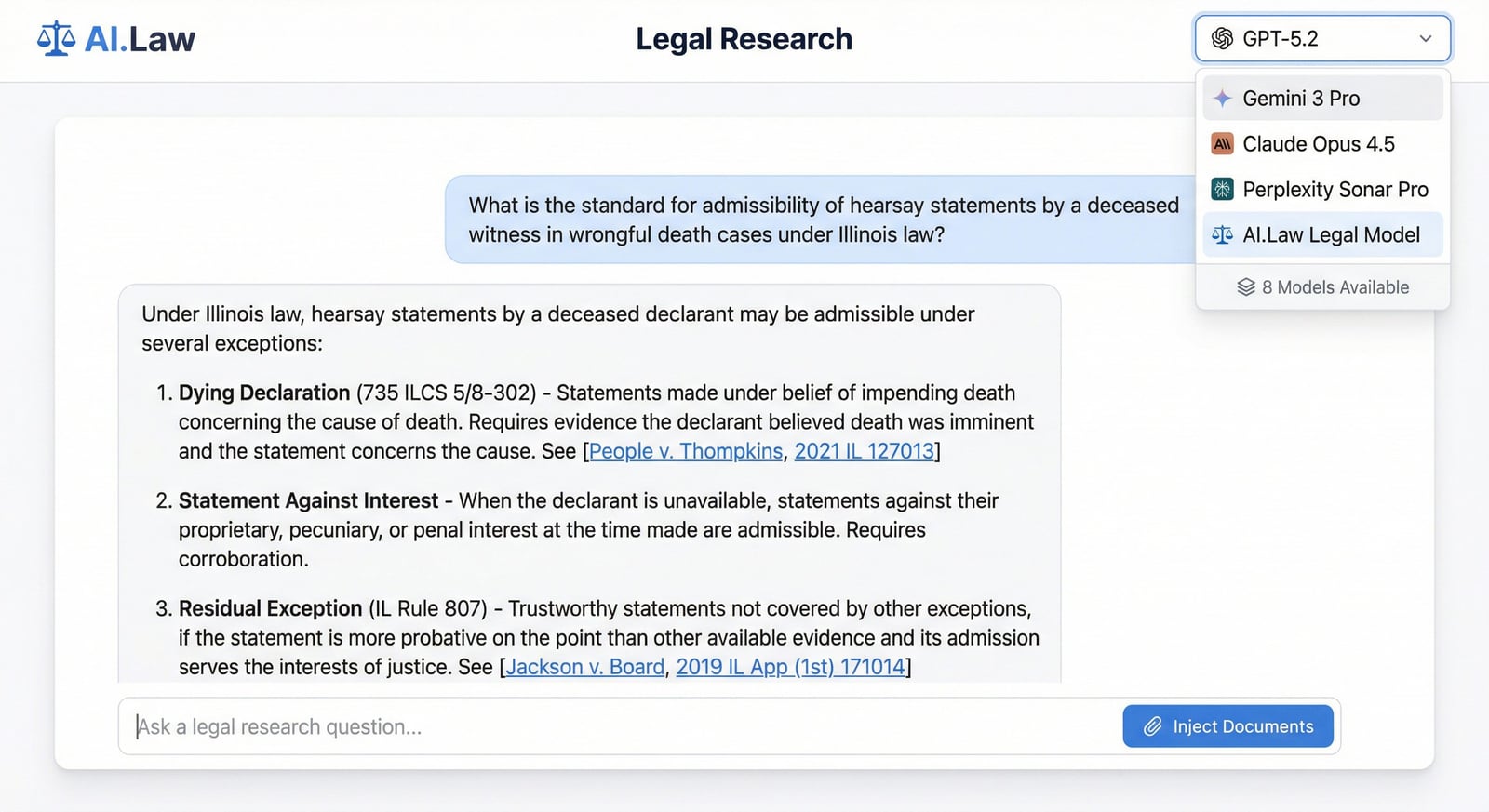
Legal Research is the AI.Law tool civil litigators use for document, research, and case-strategy work. Different legal research tasks benefit from different AI models. Perplexity excels at finding current caselaw with citations. Claude excels at complex analytical reasoning about statutory interpretation or multi-factor tests. GPT handles broad legal knowledge and drafting tasks well. AI.Law’s legal model is trained specifically for litigation output. Instead of paying for four separate subscriptions and copy-pasting between tabs, switch models with a dropdown in the same conversation. Ask your question, compare answers, and use the best result — in seconds.
On a live matter it runs in 4 steps: (1) Choose your model, (2) Ask your question or use a prompt, (3) Inject case documents, (4) Save to your library. Select from 10 AI models in a single dropdown — GPT, Claude, Gemini, Perplexity, AI.Law’s legal model, and more. Each model has different strengths for different research tasks.
Westlaw gives you cases. ChatGPT gives you general knowledge. AI.Law gives you 10 AI models in one interface — each with different strengths — plus the ability to inject your actual case documents into the conversation. Research the elements of a premises liability claim in your jurisdiction, then inject the incident report and ask "does the plaintiff’s description establish the notice element?" Use Perplexity when you need current caselaw with citations. Use Claude when you need deep analytical reasoning about a complex issue. Use AI.Law’s legal model when you need litigation-specific output. Save every conversation to a personal research library organized by matter, topic, and model — come back and continue where you left off. 10 AI models in a single dropdown: GPT-4o, Claude, Gemini, Perplexity, AI.Law’s legal model, and more — switch models mid-conversation or compare answers across models on the same question.
What a strong research session produces
The output is built for litigators who need to move from question to usable authority quickly, not for students collecting background material.
- Candidate doctrines and issue frames when the legal theory is still emerging
- Clarifying questions that narrow the jurisdiction, procedural posture, and factual posture
- Boolean and CourtListener search queries tuned to the exact research problem
- Screened cases with relevance explanations tied to the user's actual question
- Numeric case scoring across the relevance factors already used in the research workflow
- Research-library history so promising lines of inquiry are not lost after one session
- Model choice across GPT, Claude, Gemini, Perplexity, and AI.Law's legal workflow
- A cleaner path from ideation to citable authority instead of a single one-shot answer
How It Works
Get started in minutes. No training required.
1. Choose your model
Select from 10 AI models in a single dropdown — GPT, Claude, Gemini, Perplexity, AI.Law’s legal model, and more. Each model has different strengths for different research tasks.
2. Ask your question or use a prompt
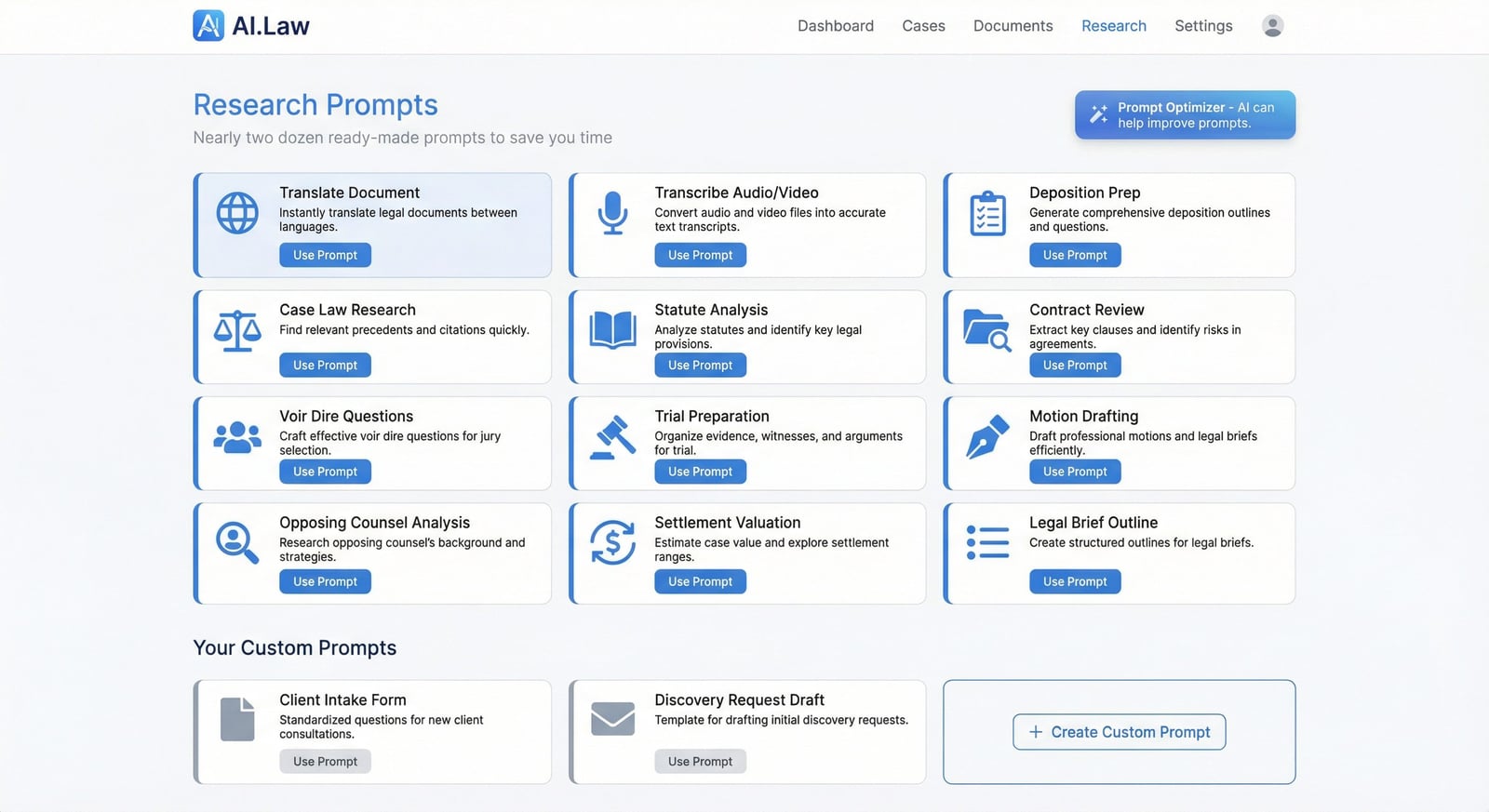
Type your legal research question or choose from nearly two dozen pre-built prompts designed for litigation — deposition prep, motion research, case law analysis, jury instructions, and more.
3. Inject case documents
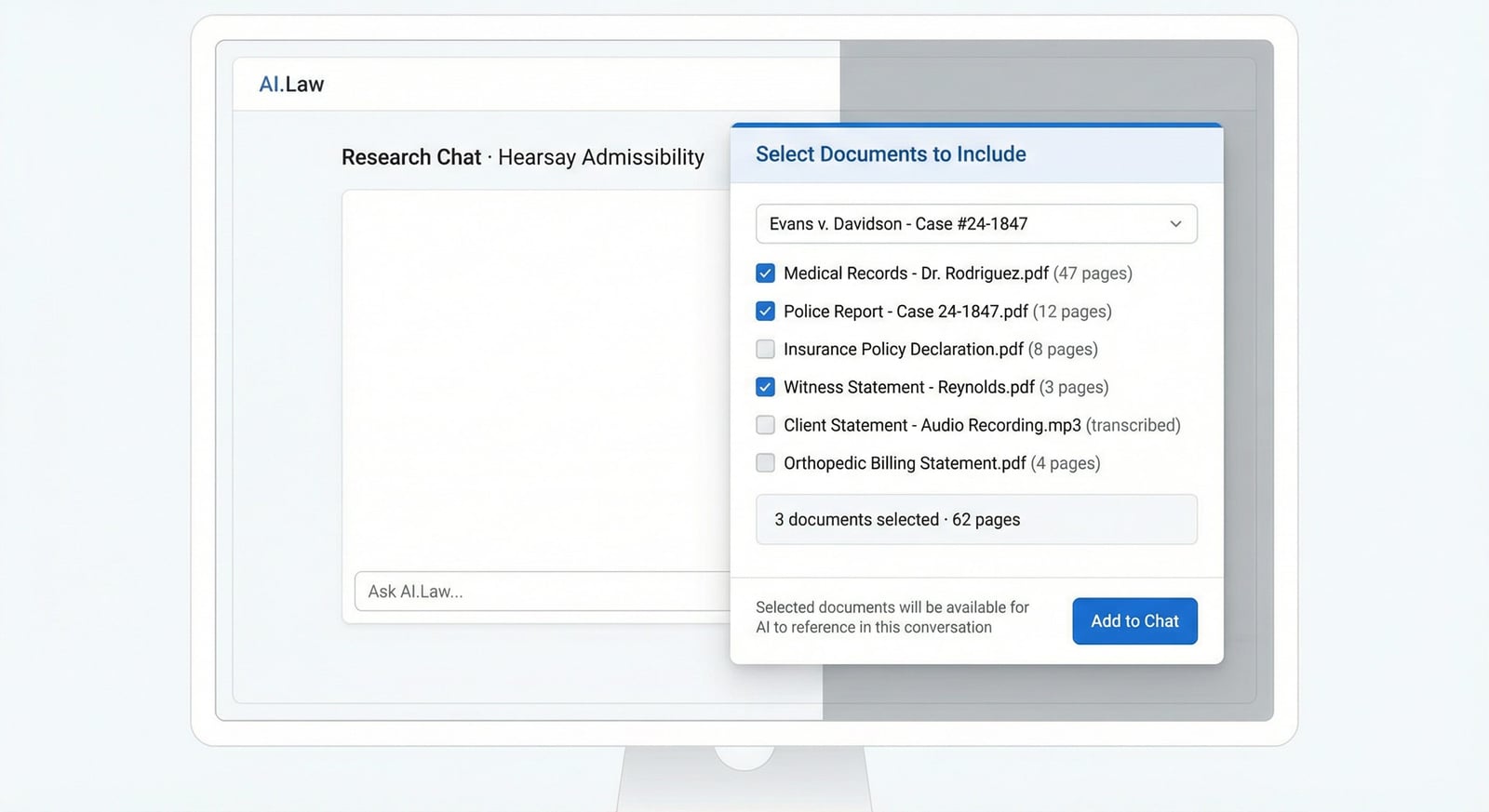
Select documents from any matter and inject them into the conversation. Ask questions about your actual complaint, discovery responses, medical records, or deposition transcripts.
4. Save to your library
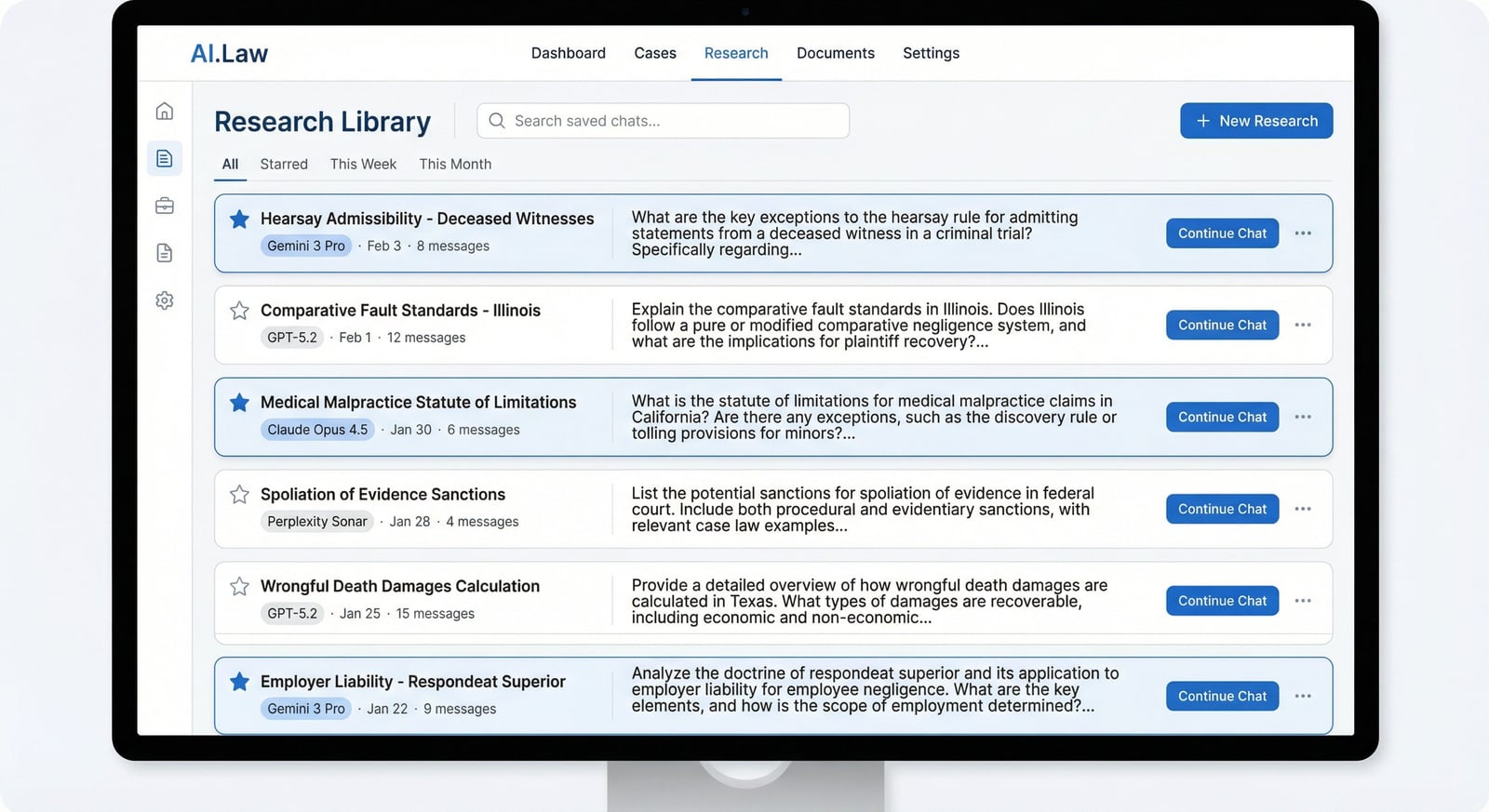
Save conversations to your personal research library organized by matter, topic, and model. Return anytime to continue where you left off or reference prior research.
See Legal Research in a real matter
Not a mockup — this is the actual AI.Law workspace attorneys use on live cases.
Real document → real research
Research prompt + injection: Inject: filed Ohio complaint (products liability) · Ask: "What affirmative defenses will defendant likely raise under Rule 8(c) and Ohio equivalents?" · Model: Claude
AI.Law returns: Structured analysis: comparative fault, assumption of risk, product misuse, statute of limitations, failure to mitigate — each tied to allegations in ¶¶14-22 · suggested discovery to rebut each defense · saved to matter research library.
Switch models mid-thread — Perplexity for current caselaw, Claude for multi-step analysis.
Case-connected legal research FAQs
Can I inject discovery responses and deposition excerpts, not just pleadings?
Select any documents from any matter — complaints, answers, interrogatory responses, deposition transcripts, medical records — and ask questions grounded in the actual text.
Which AI models are available in one interface?
Ten models in one dropdown: GPT, Claude, Gemini, Perplexity, AI.Law's legal model, and others. Conversations save to a personal research library organized by matter and topic.
Does this replace Westlaw or Lexis for citation verification?
Use Perplexity or AI.Law's legal model for research acceleration and case-specific analysis. Pair with Brief Analyzer for citation-by-citation verification against CourtListener when opposing counsel cites authority.
How attorneys use Legal Research
Real scenarios from litigation practice — not hypotheticals.
Researching an issue before you know the exact doctrine name
A foreclosure case depends on an earlier judgment that was later vacated, and you need to know what legal theories could unwind the later action. You may not know yet whether the strongest frame is subject matter jurisdiction, failure of a predicate judgment, voidness, or preclusion. AI.Law's legal research tool lets you start with the problem instead of the citation. It helps you ideate possible doctrines, asks clarifying questions, generates tailored Boolean searches, and then screens the returned authority so you can move from fuzzy issue to targeted research path without getting stuck at the first step.
Comparing how jurisdictions handle the same procedural question
You are briefing proportionality limits on third-party discovery and want to see whether federal courts in different circuits are trending toward narrower or broader discovery. Instead of running the same search manually in multiple systems, you ask the tool to compare treatment across circuits. It returns the governing standards, the distinctions between jurisdictions, and the cases that actually matter for the split you are studying. That makes it much easier to decide whether you are arguing from controlling authority, persuasive authority, or a true open question.
Injecting your own case file into the research question
The complaint, answer, and discovery responses already live in the matter, and your question is not abstract: you want to know which affirmative defenses are likely to be raised against these exact facts. Legal Research can use the matter record as context, not just a generic prompt. It analyzes the file, identifies the most likely defenses or authorities implicated by the facts, and then guides you into targeted case law research from there. That is a different workflow from searching a treatise for a broad overview and then trying to map it back onto your file manually.
Testing whether a cited case is actually on point
Search results often include cases that look relevant from the title, key passage, or a single headnote but fall apart once you read the opinion. AI.Law's legal research flow now screens the top cases more deeply and explains why a case is or is not relevant to the precise research question. That saves you from building an argument around authority that sounds close at first glance but does not really answer the issue you need briefed.
More Detail
10 models, case document injection, and a research library — purpose-built for litigation research
Westlaw gives you cases. ChatGPT gives you general knowledge. AI.Law gives you 10 AI models in one interface — each with different strengths — plus the ability to inject your actual case documents into the conversation. Research the elements of a premises liability claim in your jurisdiction, then inject the incident report and ask "does the plaintiff’s description establish the notice element?" Use Perplexity when you need current caselaw with citations. Use Claude when you need deep analytical reasoning about a complex issue. Use AI.Law’s legal model when you need litigation-specific output. Save every conversation to a personal research library organized by matter, topic, and model — come back and continue where you left off.
- 10 AI models in a single dropdown: GPT-4o, Claude, Gemini, Perplexity, AI.Law’s legal model, and more — switch models mid-conversation or compare answers across models on the same question
- Inject documents from any matter directly into the research chat: upload the complaint and ask "What affirmative defenses will the defendant raise under Rule 8(c)?" or inject discovery responses and ask "Which interrogatory answers are deficient under Rule 33?"
- Saved research library organized by date, matter, model, and topic — every conversation preserved with full context so you never redo research you already completed
- Nearly two dozen pre-built prompts designed for litigators: deposition preparation, voir dire questions, motion research, case law analysis, document summarization, translation, transcription, and more
Faster
The right model for each question — elements from one, analysis from another, current caselaw from a third
Different legal research tasks benefit from different AI models. Perplexity excels at finding current caselaw with citations. Claude excels at complex analytical reasoning about statutory interpretation or multi-factor tests. GPT handles broad legal knowledge and drafting tasks well. AI.Law’s legal model is trained specifically for litigation output. Instead of paying for four separate subscriptions and copy-pasting between tabs, switch models with a dropdown in the same conversation. Ask your question, compare answers, and use the best result — in seconds.
- Use Perplexity when you need current caselaw with URLs and citations — "What is the current standard for proportionality under Rule 26(b)(1) in the Sixth Circuit?"
- Use Claude for complex multi-step analysis — "Analyze whether these facts support a claim for negligent entrustment under Ohio law, considering the employer knew about prior incidents"
- Inject your actual case documents and get case-specific analysis — not generic legal knowledge that doesn’t account for your facts
- Saved conversations mean the research you did on the summary judgment standard last month is still there — no re-doing work because a browser tab was closed
Easier
Inject the complaint, ask about affirmative defenses — research connected to your actual case
Generic legal research tools don’t know about your case. AI.Law’s research chat lets you inject documents from any matter directly into the conversation — so you can ask questions about your actual facts, your actual pleadings, and your actual discovery. Inject the defendant’s answer and ask "Which affirmative defenses have factual support in the record?" Inject a deposition transcript and ask "Did this witness admit to knowledge of the defect?" The AI analyzes your documents with the same legal knowledge it applies to general research.
- Pre-built prompts for litigation tasks: deposition preparation outlines, voir dire question sets, motion research frameworks, case law analysis structures, jury instruction research, and trial preparation checklists
- Custom prompt builder with AI prompt optimizer — describe what you want and AI suggests a refined prompt that produces better, more structured results
- Transcribe audio and video files directly within the research platform — recorded statements, voicemails, surveillance footage, hearing recordings — searchable text in seconds
- Select any documents from any matter to inject into a research conversation — the AI reads the full document and answers questions about the actual content
More Money
Eliminate $100+/month in separate AI subscriptions and produce stronger legal arguments
Most litigators are paying for ChatGPT ($20/month), Claude ($20/month), and often Perplexity ($20/month) — per user. That’s $60–$100/month per attorney in separate AI subscriptions, each with its own interface, none connected to your case files, and none designed for legal work. AI.Law gives you 10 models in one interface, connected to your case documents, with pre-built legal prompts and a saved research library — all included. And better research means stronger arguments, more thorough preparation, and cases that resolve at higher values.
- Eliminate $60–$100/month per attorney in separate AI subscriptions — 10 models included in your AI.Law plan
- Research connected to your actual case documents produces stronger, more relevant legal arguments than generic chatbot answers
- Saved research library eliminates re-work — the motion standard you researched last month is instantly accessible when you need it on another case
- Better-researched cases produce stronger positions in every motion, every negotiation, and every trial — thoroughness translates directly to outcomes and revenue
Stop juggling separate AI subscriptions that don’t know about your cases
See what changes when AI handles the work instead.
| Area | The Old Way | With AI.Law |
|---|---|---|
| AI models | Separate subscriptions to ChatGPT, Claude, Perplexity — $60–$100/month per user | 10 models in one interface — switch with a dropdown, all included in your plan |
| Case connection | Copy-paste documents into generic chatbots with no case context | Inject documents from any matter — research grounded in your actual case files |
| Research storage | Conversations lost when you close the browser tab | Saved library organized by matter, topic, and model — every conversation preserved |
| Legal prompts | Write prompts from scratch, hoping the AI understands legal context | Nearly two dozen pre-built prompts designed for deposition prep, motion research, trial preparation, and more |
| Specialization | General-purpose AI with no legal training or litigation focus | AI.Law’s legal model trained for litigation output, plus 9 general-purpose models for different tasks |
Research should feed the rest of the litigation workflow
Legal research is rarely the final deliverable. It is what shapes the complaint, the motion, the discovery dispute, or the negotiation position that comes next. Inside AI.Law, research can start from the issue spotter, from the pleadings already drafted, or from questions raised by discovery. Once the authorities are identified, the results feed directly into drafting tools and matter strategy instead of living in a separate tab or a disconnected notes document.
- Issue Spotter — Surface possible claims, defenses, or procedural issues worth researching
- Legal Research (this tool) — Identify doctrines, find authority, and screen whether the cases are actually on point
- Lawsuit Drafting — Use the researched elements and standards to plead claims more precisely
- Motions — Turn the governing standards and best cases into a motion or opposition strategy
- Memo Contras — Distinguish adverse cases and build counterarguments once the other side cites authority
- Action Plan — Convert the research into strategic next steps for the matter
Key concepts in litigation research
Understanding the legal framework behind the tool helps you get more from it.
Standards of review
The standard of review determines how an appellate court evaluates a lower court ruling: de novo, abuse of discretion, clear error, and so on. It can shape the entire briefing strategy because an argument that sounds persuasive under de novo review may be far weaker when the trial court receives heavy deference.
Controlling versus persuasive authority
A case from your own supreme court or controlling appellate court usually binds the lower court unless it is distinguishable. Cases from other jurisdictions, lower courts, or analogous procedural contexts may still be useful, but they persuade rather than control. Strong research separates these categories so the lawyer knows which authorities establish the rule and which ones merely support the policy argument.
Procedural posture matters
The same legal issue can produce different outcomes depending on whether it arises on a motion to dismiss, summary judgment, post-trial motion, or appeal. Good research does not stop at matching keywords. It also asks whether the cited case addressed the issue at the same stage of the case and under the same burden of proof.
Negative treatment and doctrinal drift
A case may still exist in the reporters but no longer reflect the current state of the law because it was limited, criticized, or overtaken by later authority. Research that looks good on the day you first collect it still needs ongoing scrutiny if the issue is important enough to brief or argue in court.
Related tools for Legal Research
Same matter file, same uploads — keep working in this litigation workflow cluster.
- Verify citations from research against CourtListener — Brief Analyzer & Citation Lookup
- Turn research into full motion memoranda — Motion Drafting
- Chat with case files using the same model dropdown — AI Associate
- Research claim elements before drafting the complaint — Lawsuit Drafting
Browse all Admin tools on the features hub, or see all features.
Free practice management. Pay only for AI you use.
Run your firm on Free Forever at $0 — CRM, calendar, billing, and document management for everyone. Add paid AI seats only for the people who need them, all on one plan for your firm: Core, Litigator, or Advanced.
- 11 tools free forever — no credit card required
- One plan for your firm — every paid seat on the same plan
- Cancel any paid seat anytime — no lock-in
- Annual billing: 12 months for the price of 11 on paid seats
- Free Forever practice management stays at $0
SOC 2 Type II Certified · Patented Technology · No AI Training on Your Data · You Own Your Data
Explore More
Every citation verified against the actual case — before opposing counsel finds the one you got wrong
Upload any brief or motion. AI extracts every citation, verifies it exists, confirms the holding matches the proposition cited, and flags misrepresentations — then finds counter-authorities for every weak point.
Get started with Legal Research
Open a free practice management account, or build an AI plan when you’re ready.
No credit card required.
Need a firm or enterprise plan? Talk to our team