Struggling With a 10,000-Page Case File? 7 Ways AI Can Help You Work Through It

A 10,000-page production is not difficult only because of its size. It may include medical records, deposition transcripts, emails, exhibits, and duplicates spread across folders and file formats. Finding a fact is one challenge; understanding how it connects to the claims and defenses is another.
Legal document processing AI can help turn that volume into a more usable record. The practical value is not that software makes the lawyer’s decisions. It is that it can organize information, surface leads, and make it easier to trace an answer back to its source. Here are seven tasks where AI for lawyers can help.
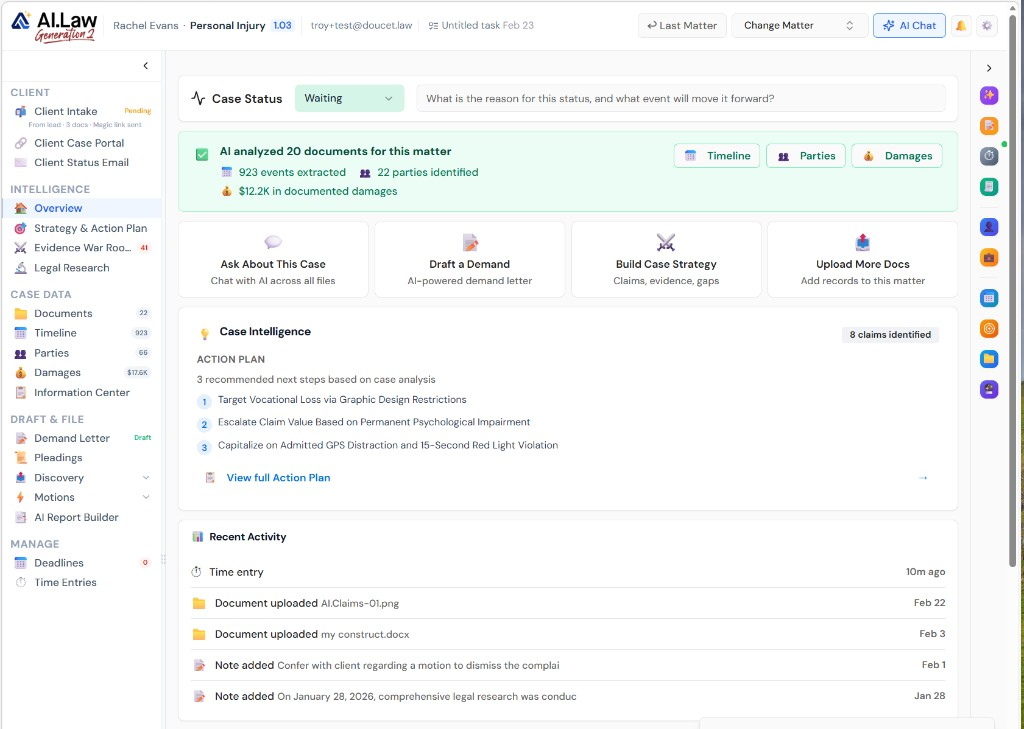
1. Put the whole file in one workspace: Connect documents to the matter
When materials sit in separate folders, email threads, and shared drives, even a basic question can require a search across several places. A matter-centered workspace brings pleadings, discovery, correspondence, transcripts, and exhibits together so they can be reviewed in context.
That matters when a new deposition arrives or a client sends another batch of medical records. Instead of relying on someone to remember where each item belongs, a connected file gives the team a common place to start. A document management workspace can also make the contents searchable, not just the filenames.
2. Ask plain-English questions: Find answers with source citations
Once documents are searchable, a lawyer can ask a focused question across the file: What did the driver say about the traffic signal? Or: Which providers treated the shoulder injury, and on what dates?
An AI answer is most useful when it points back to the underlying document and page. That gives counsel a starting place for checking the answer against the deposition, record, or exhibit, not a substitute for checking it. AI.Law’s AI Associate is designed to answer questions about case materials with citations to their sources.
3. Classify and file documents: Make a large production easier to navigate
A production might contain hundreds of files named with Bates numbers or generic scan labels. AI can classify documents by type (such as pleading, medical record, email, or transcript) and route them into an organized folder structure.
This can save time on repetitive sorting and make a first-pass review easier to manage. It does not mean every classification is right. A document may fit more than one category, and unusual or sensitive files still warrant attorney or staff review. See how automated file routing and document classification can support that process.
4. Build a dated chronology: See events across different records
A chronology can draw dates and events from sources that are usually reviewed separately. In a personal injury matter, for example, a timeline may bring together the incident date, emergency treatment, follow-up visits, imaging, work absences, and statements made in a deposition.
The timeline is a working aid, not a finding of fact. Dates can be missing, imprecise, or recorded differently in different sources. Reviewing the source behind each entry helps resolve discrepancies and distinguish what the record shows from what still needs investigation. Medical record analysis and data extraction can help organize dates and related information.

5. Identify parties, witnesses, and key players: Understand who appears in the record
Names can appear in pleadings, emails, medical records, and testimony in different forms. AI can help assemble a preliminary list of parties, witnesses, providers, employers, and other people who appear in the file.
That list can reveal practical follow-up questions: Is a treating provider missing from the records? Does a witness appear in correspondence but not in the deposition outline? Are two name variations likely to refer to the same person? Those possibilities need confirmation, especially when names are common or documents contain errors. The tool helps surface connections; counsel determines their significance.
6. Map claims and defenses to evidence: Spot areas that need attention
For each claim or defense, the legal elements provide a structure for reviewing the evidence. AI can help organize relevant testimony, exhibits, and documents under those elements, then flag areas where the file appears thin or where a supporting source has not yet been found.
For example, a liability theory may have several documents supporting notice but little in the file addressing causation. That gap can guide additional discovery, witness preparation, or investigation. It is not a conclusion that proof does, or does not, exist. Counsel should assess the governing law, the record, and the evidentiary standard. AI.Law’s Evidence War Room is built to connect claims and defenses with evidence and potential gaps.

7. Verify citations and quotations: Check the source before relying on them
A summary, chronology, or draft is only useful if its citations lead to the right material. Before relying on an AI-generated quote or factual statement in a filing, check that it matches the source document and preserves the relevant context. Confirm the page, the speaker, and whether surrounding testimony changes the meaning.
Clickable citations and highlighted source passages can make this review more direct. They do not remove the need to verify the material. AI.Law’s Brief Analyzer and Citation Lookup supports citation review, while its AI Associate links answers to source documents.
Keep confidentiality and lawyer oversight in the workflow
Case files often contain confidential client information, personal data, and privileged communications. Before using any AI litigation software with matter materials, lawyers should understand how the provider handles data, including retention, access, security, and whether submitted data is used to train models.
ABA Formal Opinion 512 discusses lawyers’ professional responsibilities when using generative AI, including competence and protecting client information. Read the opinion and assess the tool’s actual terms and safeguards. AI.Law states that it does not train AI models on private case data; firms should still review the applicable privacy and security terms for their use.
The takeaway: Use AI to make the record workable
A useful workflow moves from collecting and organizing the file to asking questions, building timelines, identifying people, mapping evidence, and checking citations. At each step, the lawyer remains responsible for deciding what matters and whether the output is reliable.
For firms looking to connect those tasks in one civil litigation operating system, AI.Law brings case materials and litigation tools into a shared matter workspace. Its drafting engine is covered by U.S. Patent No. 12,461,932. The broader lesson is simple: let AI reduce the time spent sorting and searching, then use professional judgment to evaluate the evidence and decide what to do next.