Firm-level document templates that AI populates with matter-specific data — institutional best practices in one click
Create templates for any document your firm produces repeatedly — engagement letters, standard motions, discovery requests, settlement correspondence frameworks, and form pleadings — and AI.Law populates them with matter-specific data automatically. Your firm’s best work becomes the starting point for every new document, not the institutional knowledge that walks out the door when an attorney leaves.
How Document Templates works on a live matter
Document Templates is the AI.Law tool civil litigators use for pleading, motion, and contract drafting. Populating a 10-page engagement letter template manually — replacing client name, adverse party, case type, fee arrangement, scope of representation, and jurisdiction-specific disclosures — takes 15–20 minutes and inevitably produces errors. AI.Law populates every field from the matter data in seconds. The attorney reviews the completed document, makes any case-specific adjustments, and sends it. Five minutes instead of twenty, with zero missed fields.
On a live matter it runs in 4 steps: (1) Create or upload a template, (2) Select a template for a matter, (3) Review and customize, (4) Export and use. Build a new template in the editor with smart field placeholders, or upload an existing document and convert it to a template by marking the variable fields.
Traditional document templates are Word files with “[INSERT CLIENT NAME]” and “[INSERT DATE]” placeholders. Someone copies the template, manually replaces every field, and inevitably misses one — sending settlement correspondence addressed to the wrong party or an engagement letter with last case’s fee arrangement. AI.Law templates are intelligent: they pull data directly from the matter (client name, adverse party, case number, court, dates, claim types) and populate every field automatically. No manual replacement. No missed fields. No embarrassing errors. Smart field population: templates pull client names, adverse parties, case numbers, court information, and dates directly from the matter — no manual entry.
All fields populated from matter data in seconds — no find-and-replace, no manual typing. Template builder with drag-and-drop sections and smart field insertion — no coding or special syntax. Each output cites the source pages in your matter so you can verify it before you file.
What you get from Document Templates
Every Document Templates run is grounded in your uploaded matter — not a blank chat prompt. Here is what attorneys use on real cases:
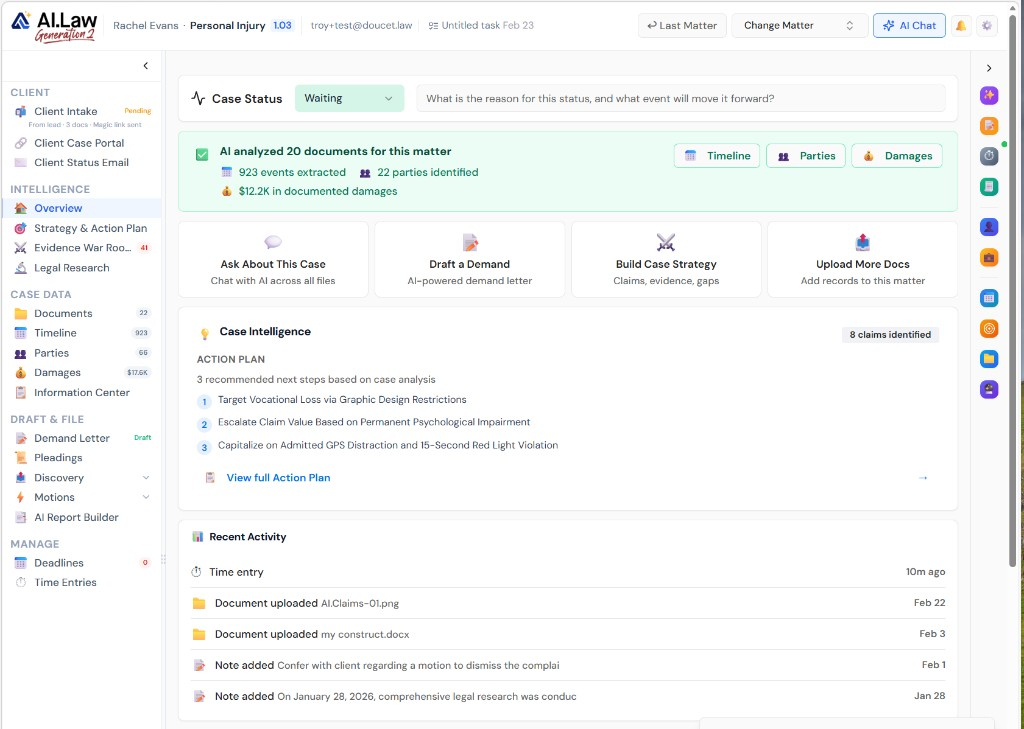
- Smart field population: templates pull client names, adverse parties, case numbers, court information, and dates directly from the matter — no manual entry
- Conditional sections: include or exclude template sections based on case type, jurisdiction, or matter attributes — a premises liability engagement letter includes different scope language than a medical malpractice one
- Firm-level template library: create, share, and maintain templates across the firm — every attorney uses the same starting point
- Version control: track template changes over time — know who modified the template, when, and why
- All fields populated from matter data in seconds — no find-and-replace, no manual typing
- Preview before finalizing: see the completed document with all fields populated before exporting
- Template builder with drag-and-drop sections and smart field insertion — no coding or special syntax
- Categorized template library: engagement letters, motions, discovery, correspondence, pleadings — organized and searchable
How It Works
Get started in minutes. No training required.
1. Create or upload a template
Build a new template in the editor with smart field placeholders, or upload an existing document and convert it to a template by marking the variable fields.
2. Select a template for a matter
Browse the firm’s template library, select the appropriate template, and AI.Law populates every field with data from the current matter.
3. Review and customize
Review the populated document. Make any case-specific adjustments, add or remove sections, and refine the language.
4. Export and use
Export the completed document with page formatting applied. Send, file, or save to the matter — ready to use without additional formatting.
More Detail
Templates that understand your data — not static Word documents with blank fields
Traditional document templates are Word files with “[INSERT CLIENT NAME]” and “[INSERT DATE]” placeholders. Someone copies the template, manually replaces every field, and inevitably misses one — sending settlement correspondence addressed to the wrong party or an engagement letter with last case’s fee arrangement. AI.Law templates are intelligent: they pull data directly from the matter (client name, adverse party, case number, court, dates, claim types) and populate every field automatically. No manual replacement. No missed fields. No embarrassing errors.
- Smart field population: templates pull client names, adverse parties, case numbers, court information, and dates directly from the matter — no manual entry
- Conditional sections: include or exclude template sections based on case type, jurisdiction, or matter attributes — a premises liability engagement letter includes different scope language than a medical malpractice one
- Firm-level template library: create, share, and maintain templates across the firm — every attorney uses the same starting point
- Version control: track template changes over time — know who modified the template, when, and why
Faster
From template to completed document in seconds — not 20 minutes of find-and-replace
Populating a 10-page engagement letter template manually — replacing client name, adverse party, case type, fee arrangement, scope of representation, and jurisdiction-specific disclosures — takes 15–20 minutes and inevitably produces errors. AI.Law populates every field from the matter data in seconds. The attorney reviews the completed document, makes any case-specific adjustments, and sends it. Five minutes instead of twenty, with zero missed fields.
- All fields populated from matter data in seconds — no find-and-replace, no manual typing
- Preview before finalizing: see the completed document with all fields populated before exporting
- Batch generation: create the same document type for multiple matters simultaneously
- Templates combine with AI.Law’s page formatting for court-compliant output in one step
Easier
Create a template once — every attorney at the firm benefits forever
When a senior partner drafts the perfect motion to compel template or the ideal engagement letter, that work product should benefit every attorney at the firm for every future case. AI.Law’s template library stores and shares templates firm-wide. Any attorney can select a template, populate it with matter data, and produce a document that reflects the firm’s best practices — without needing the senior partner’s help.
- Template builder with drag-and-drop sections and smart field insertion — no coding or special syntax
- Categorized template library: engagement letters, motions, discovery, correspondence, pleadings — organized and searchable
- Role-based access: firm administrators control who can create and modify templates, while all attorneys can use them
- Template suggestions: AI recommends relevant templates based on the matter type and current case posture
More Money
Institutional knowledge preserved in templates — your firm’s best work is never lost
When a senior partner retires, their engagement letter template, their standard motion to compel, and their preferred discovery request formats leave with them — unless those documents are captured as firm templates. AI.Law’s template library is institutional memory: every best-practice document preserved, accessible to every attorney, and automatically populated with current matter data. New associates produce senior-partner-quality documents from day one.
- Knowledge preservation: firm best practices survive attorney turnover — templates stay when people leave
- Associate onboarding: new attorneys produce quality documents immediately using firm-approved templates
- Consistency: every document reflects the firm’s standards regardless of which attorney produces it
- Time savings compound: a 15-minute savings per document across 50 documents per month is 12+ hours of recovered attorney time
Stop copying Word documents and doing find-and-replace for every new case
See what changes when AI handles the work instead.
| Area | The Old Way | With AI.Law |
|---|---|---|
| Field population | Manual find-and-replace — miss a field and send a letter addressed to the wrong client | Smart fields populated automatically from matter data — zero missed fields |
| Template access | Templates saved on one attorney’s desktop or buried in a shared drive folder | Centralized template library accessible to every attorney at the firm |
| Consistency | Each attorney has their own version of the “standard” template — none are the same | One firm-approved template — consistent output regardless of which attorney uses it |
| Knowledge retention | Best-practice templates leave with the attorney who created them | Templates preserved in the firm library — institutional knowledge that survives turnover |
| Time per document | 15–20 minutes of find-and-replace and formatting | Seconds to populate, minutes to review — formatted and ready to send |
Related tools for Document Templates
Same matter file, same uploads — keep working in this litigation workflow cluster.
- Ensure every generated document meets court formatting rules — Page Formatting
- Draft multi-page contracts from firm-approved templates — Contract Drafts
- Populate pleading templates with AI-extracted case facts — Lawsuit Drafting
Browse all Drafting tools on the features hub, or see all features.
Free practice management. Pay only for AI you use.
Run your firm on Free Forever at $0 — CRM, calendar, billing, and document management for everyone. Add paid AI seats only for the people who need them, all on one plan for your firm: Core, Litigator, or Advanced.
- 11 tools free forever — no credit card required
- One plan for your firm — every paid seat on the same plan
- Cancel any paid seat anytime — no lock-in
- Annual billing: 12 months for the price of 11 on paid seats
- Free Forever practice management stays at $0
SOC 2 Type II Certified · Patented Technology · No AI Training on Your Data · You Own Your Data
Explore More
Every provider, treatment, diagnosis, and cost — extracted with page citations
AI.Law reads every page of your uploaded medical records — ER visits, MRI reports, orthopedic consultations, physical therapy notes, surgical records, billing statements — and generates a structured analysis with treatment timelines, total costs by provider, causation links to the incident, and pre-existing condition identification. Every finding cited to the specific page.
Get started with Document Templates
Open a free practice management account, or build an AI plan when you’re ready.
No credit card required.
Need a firm or enterprise plan? Talk to our team