UTBMS-coded time entries that pass billing audits — written from your rough notes by AI
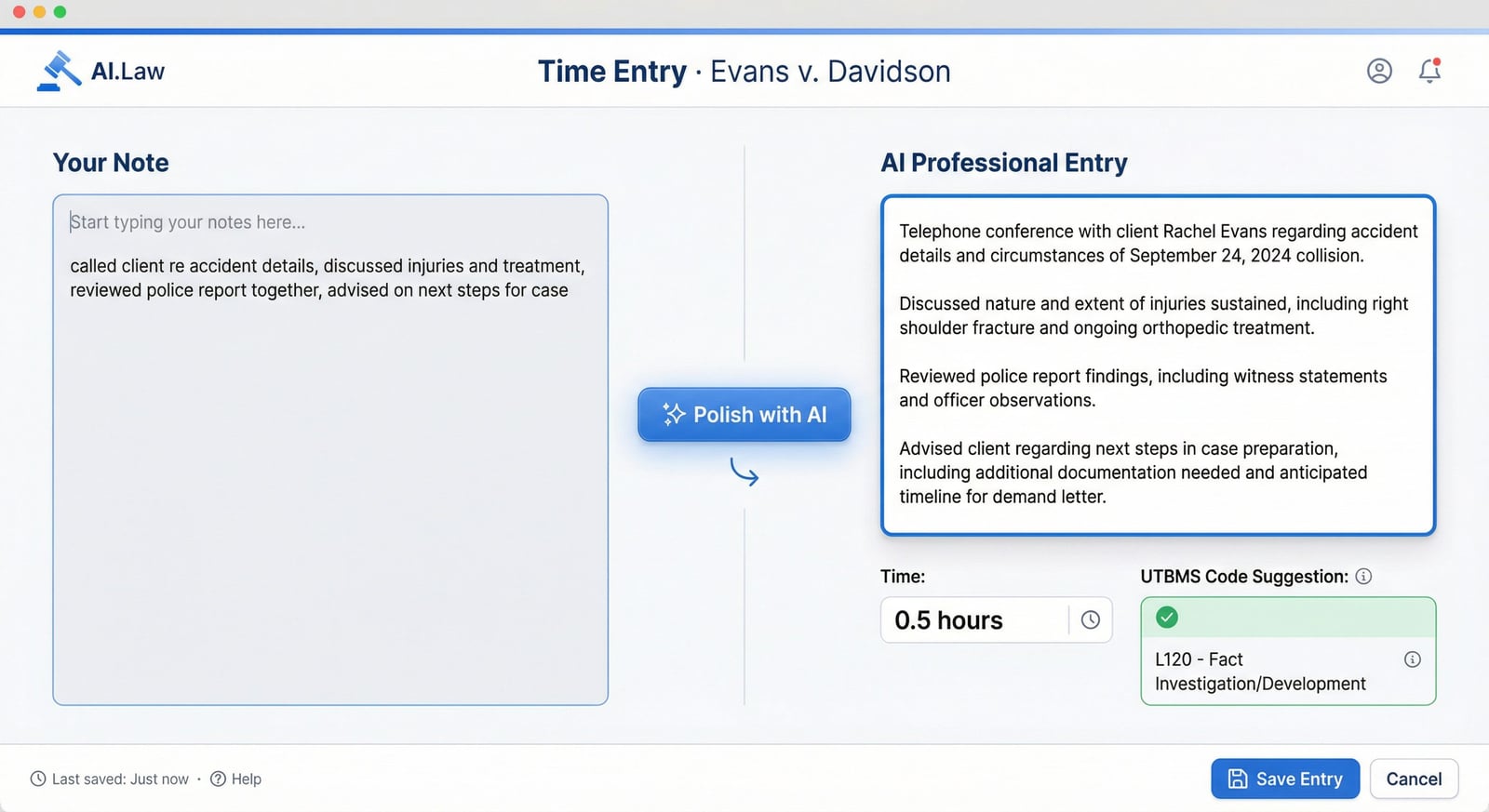
Jot "rev med recs, prep chron for settlement" and AI transforms it into a professional, segmented time entry with the correct UTBMS task code (L310 — Document Production), block billing eliminated, 0.1-hour increments properly calculated, and language that satisfies insurance defense billing guidelines and fee petition scrutiny. Upload your client’s specific billing guidelines and AI ensures compliance automatically.
Included in Free Forever — practice management at $0. Add paid AI seats when you need them. See pricing
Open Your Free Plan · Book a Demo
How Notes & Time Entry works on a live matter
Notes & Time Entry is the AI.Law tool civil litigators use for time, billing, and deadline management. It’s 6:30 PM. You reviewed medical records on the Garcia matter, took a deposition on Johnson, drafted a motion to compel on Williams, and had a settlement call on Thompson. You need to bill all four matters with proper entries before you leave. Without AI, you’re spending 20 minutes crafting language, looking up UTBMS codes, and hoping you remember how long each task took. With AI.Law, jot your shorthand for each matter, click polish, and get professional entries with billing codes — for all four matters — in under 2 minutes.
On a live matter it runs in 4 steps: (1) Jot your rough note, (2) AI polishes and codes, (3) Review and adjust, (4) Save and bill. Write what you did in your own words — shorthand, abbreviations, rough language. "Rev recs, prep settlement outline, call adj re: settlement authority" — whatever captures the work fastest.
Insurance defense attorneys know the pain: your client’s litigation management company rejects 30% of your bill because entries are block-billed, UTBMS codes are wrong, or descriptions don’t match approved task categories. Plaintiff attorneys face similar scrutiny in fee petitions under § 1988 or common fund doctrine — judges reduce hours when entries are vague or lumped together. AI.Law’s time entry system eliminates both problems. Write "rev med recs, draft chron, call client re: treatment" and AI splits it into three properly segmented entries, each with the correct UTBMS code (L310, L120, L050), each with descriptive language that passes billing audits and fee petition scrutiny. Block billing detection and automatic segmentation — "Reviewed records and drafted motion" becomes two entries: L310 document review (0.8 hrs) and L230 motion drafting (1.2 hrs), each with specific descriptions.
What you get from Notes & Time Entry
Every Notes & Time Entry run is grounded in your uploaded matter — not a blank chat prompt. Here is what attorneys use on real cases:
- Block billing detection and automatic segmentation — "Reviewed records and drafted motion" becomes two entries: L310 document review (0.8 hrs) and L230 motion drafting (1.2 hrs), each with specific descriptions
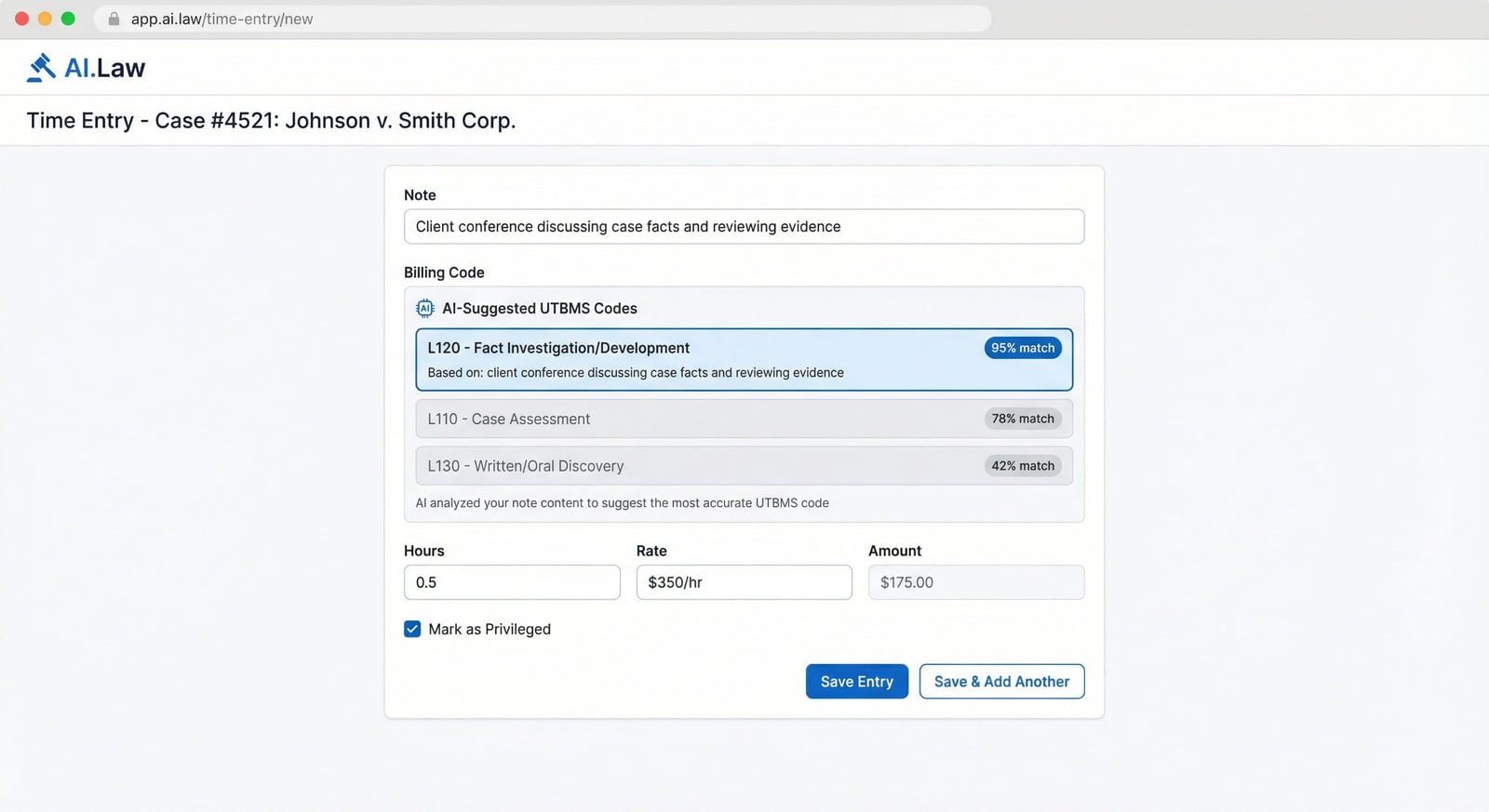
- UTBMS task codes suggested from the actual work described: L110 case assessment, L120 pre-trial pleadings, L130 discovery, L150 court motions, L160 settlement, L180 trial prep, L190 trial, L210 post-trial — not guessed from a dropdown
- Upload your client’s specific billing guidelines — AI flags entries that would violate caps, prohibited tasks, or staffing restrictions before you submit the invoice
- Privileged entry tagging for time entries that describe attorney mental impressions or strategy — mark for redaction before production in fee disputes
- Shorthand like "depo of def, 4 hrs + travel 1.5" becomes a polished entry: "Attend and conduct deposition of Defendant John Smith regarding liability and damages" with UTBMS L140 and separate travel expense entry
- AI detects when a single note describes multiple tasks and splits them into properly segmented entries — no more block billing rejections
- Write rough notes in any style — abbreviations, shorthand, bullet points — AI rewrites them as professional time entries with descriptive language
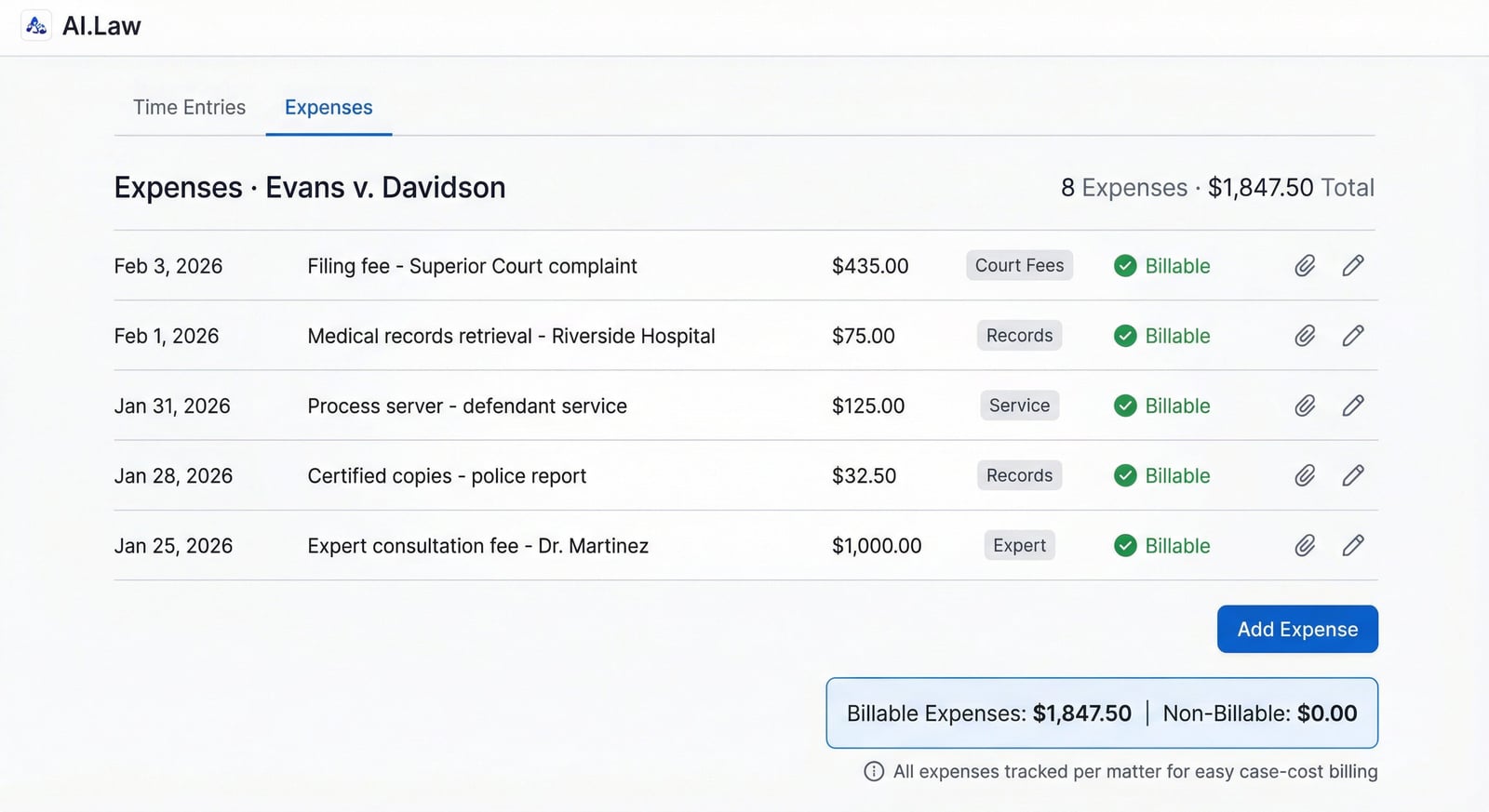
- Expenses and time entries in one unified view per matter — track filing fees, deposition costs, expert fees, and case costs alongside your billable hours
How It Works
Get started in minutes. No training required.
1. Jot your rough note
Write what you did in your own words — shorthand, abbreviations, rough language. "Rev recs, prep settlement outline, call adj re: settlement authority" — whatever captures the work fastest.
2. AI polishes and codes
Click polish and AI rewrites your note into properly segmented, professional time entries. Each entry gets a UTBMS task code suggested from the actual work described. Block billing is automatically eliminated.
3. Review and adjust
Accept the AI’s suggestions or adjust time, codes, or language. If you’ve uploaded client billing guidelines, AI flags any entries that would violate caps or prohibited tasks.
4. Save and bill
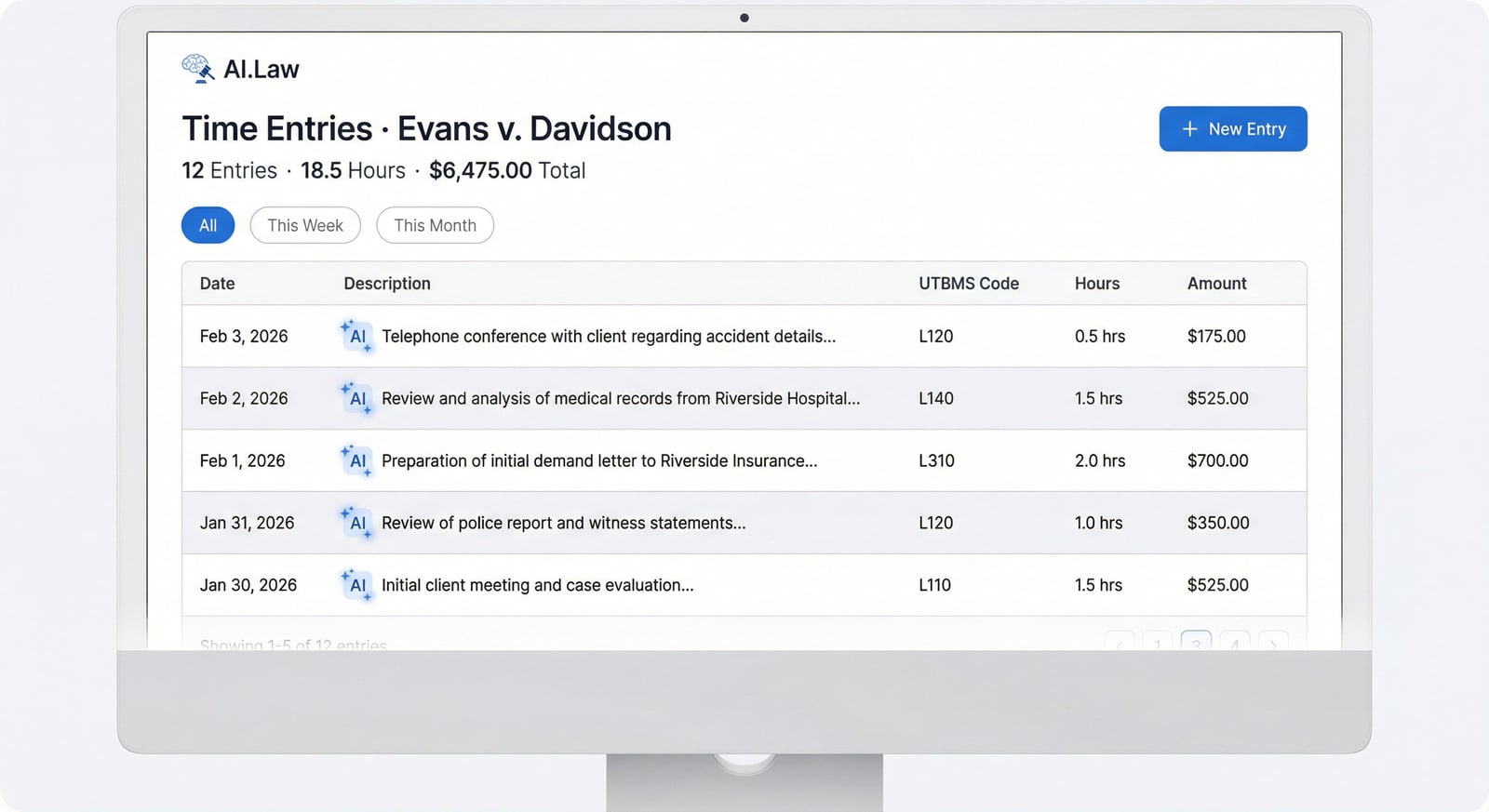
Polished entries are saved to the matter and ready for invoicing, client review, or fee petition exhibits. Expense entries tracked alongside time for complete matter billing.
More Detail
Block billing eliminated, UTBMS codes applied, billing guideline compliance built in
Insurance defense attorneys know the pain: your client’s litigation management company rejects 30% of your bill because entries are block-billed, UTBMS codes are wrong, or descriptions don’t match approved task categories. Plaintiff attorneys face similar scrutiny in fee petitions under § 1988 or common fund doctrine — judges reduce hours when entries are vague or lumped together. AI.Law’s time entry system eliminates both problems. Write "rev med recs, draft chron, call client re: treatment" and AI splits it into three properly segmented entries, each with the correct UTBMS code (L310, L120, L050), each with descriptive language that passes billing audits and fee petition scrutiny.
- Block billing detection and automatic segmentation — "Reviewed records and drafted motion" becomes two entries: L310 document review (0.8 hrs) and L230 motion drafting (1.2 hrs), each with specific descriptions
- UTBMS task codes suggested from the actual work described: L110 case assessment, L120 pre-trial pleadings, L130 discovery, L150 court motions, L160 settlement, L180 trial prep, L190 trial, L210 post-trial — not guessed from a dropdown
- Upload your client’s specific billing guidelines — AI flags entries that would violate caps, prohibited tasks, or staffing restrictions before you submit the invoice
- Privileged entry tagging for time entries that describe attorney mental impressions or strategy — mark for redaction before production in fee disputes
Faster
End-of-day time entry in 2 minutes instead of 20 — across every matter you touched
It’s 6:30 PM. You reviewed medical records on the Garcia matter, took a deposition on Johnson, drafted a motion to compel on Williams, and had a settlement call on Thompson. You need to bill all four matters with proper entries before you leave. Without AI, you’re spending 20 minutes crafting language, looking up UTBMS codes, and hoping you remember how long each task took. With AI.Law, jot your shorthand for each matter, click polish, and get professional entries with billing codes — for all four matters — in under 2 minutes.
- Shorthand like "depo of def, 4 hrs + travel 1.5" becomes a polished entry: "Attend and conduct deposition of Defendant John Smith regarding liability and damages" with UTBMS L140 and separate travel expense entry
- AI detects when a single note describes multiple tasks and splits them into properly segmented entries — no more block billing rejections
- UTBMS codes applied automatically from note content — no scrolling through code lists or memorizing task numbers
- Expenses tracked alongside time entries: filing fees, deposition costs, medical record charges, service of process fees — all coded and billable per matter
Easier
Write in your own shorthand — AI knows what UTBMS L130 looks like when you describe discovery work
You shouldn’t need to think about billing compliance while you’re doing the work. AI.Law lets you write exactly what you did — in abbreviations, shorthand, whatever is fastest — and transforms it into entries that satisfy the most demanding billing departments. The AI understands that "propounded ROGs" is UTBMS L130, that "filed MSJ" is L150, and that "trial prep witness outline" is L180. You write the substance. AI handles the compliance.
- Write rough notes in any style — abbreviations, shorthand, bullet points — AI rewrites them as professional time entries with descriptive language
- Expenses and time entries in one unified view per matter — track filing fees, deposition costs, expert fees, and case costs alongside your billable hours
- Integrated directly into each matter landing page — no separate timekeeping app, no data sync, no forgetting to switch to the billing tool
- All time entries and notes attached to the matter and available for AI analysis — the AI Associate can reference your contemporaneous notes during case preparation
More Money
The difference between a 15% write-down and getting paid in full is the quality of the time entry
Every litigation management company publishes billing guidelines. Every judge reviewing a fee petition has standards for what constitutes a properly documented time entry. Vague entries get reduced. Block-billed entries get rejected. Entries without proper task codes get bounced back. AI.Law ensures every entry you submit is as strong as it can be — properly segmented, correctly coded, and described with the specificity that billing departments and courts require. The firms that bill professionally collect more. Period.
- Eliminate write-downs from vague or block-billed entries — AI segmentation and professional language pass billing audits at 95%+ approval rates
- Fee petition support: properly documented time entries with UTBMS codes, specific task descriptions, and contemporaneous notes support lodestar calculations and survive reasonableness challenges
- Billing guideline compliance prevents the most common rejection reasons — block billing, vague descriptions, unauthorized task codes, and staffing violations
- Track actual vs. billed hours per matter to identify cases where write-offs are eating into profitability — adjust staffing and billing practices with real data
Stop losing revenue to write-downs and billing rejections
See what changes when AI handles the work instead.
| Area | The Old Way | With AI.Law |
|---|---|---|
| Entry quality | Rushed, vague entries at the end of the day that get written down or rejected | Professional, segmented entries with specific task descriptions — rewritten from your rough notes by AI |
| Block billing | Lumped tasks in a single entry that billing departments reject | AI detects block billing and automatically splits into properly segmented entries |
| UTBMS codes | Manually looking up codes or guessing — wrong codes trigger rejections | Correct UTBMS task code suggested from the actual work described — L110 through L210 applied intelligently |
| Billing guidelines | Memorize each client’s rules or hope the invoice passes review | Upload client billing guidelines — AI flags violations before you submit |
| Fee petitions | Judge reduces hours because entries are vague or poorly documented | Detailed entries with task codes and contemporaneous notes support lodestar calculations |
Related tools for Notes & Time Entry
Same matter file, same uploads — keep working in this litigation workflow cluster.
- Auto-suggest UTBMS codes from polished narratives — AI UTBMS Billing
- Push approved time entries into invoicing — Billing & Invoicing
- Track deadlines alongside billable activity — Calendar
Browse all Billing tools on the features hub, or see all features.
Free practice management. Pay only for AI you use.
Run your firm on Free Forever at $0 — CRM, calendar, billing, and document management for everyone. Add paid AI seats only for the people who need them, all on one plan for your firm: Core, Litigator, or Advanced.
- 11 tools free forever — no credit card required
- One plan for your firm — every paid seat on the same plan
- Cancel any paid seat anytime — no lock-in
- Annual billing: 12 months for the price of 11 on paid seats
- Free Forever practice management stays at $0
SOC 2 Type II Certified · Patented Technology · No AI Training on Your Data · You Own Your Data
Explore More
10 AI models for legal research — elements of claims, standards of review, circuit splits, and case-specific analysis
Research the elements of a negligence per se claim in Ohio, find the standard of review for a motion to compel under Rule 37, compare how the Sixth and Seventh Circuits apply proportionality under Rule 26(b)(1), or inject your complaint and ask "what affirmative defenses will the defendant raise under Rule 8(c)?" 10 AI models in one interface — GPT, Claude, Gemini, Perplexity, and AI.Law’s legal model — with a saved research library and nearly two dozen ready-made prompts built for litigation.
Get started with Notes & Time Entry
Open a free practice management account, or build an AI plan when you’re ready.
No credit card required.
Need a firm or enterprise plan? Talk to our team