AI-powered legal calendar that knows your cases
AI.Law automatically surfaces every deadline, statute of limitations, hearing date, and task across all your matters — then delivers a daily morning briefing so nothing falls through the cracks. Stop manually tracking dates and start trusting a calendar built on the data already in your cases.
Included in Free Forever — practice management at $0. Add paid AI seats when you need them. See pricing
Open Your Free Plan · Book a Demo
How Calendar works on a live matter
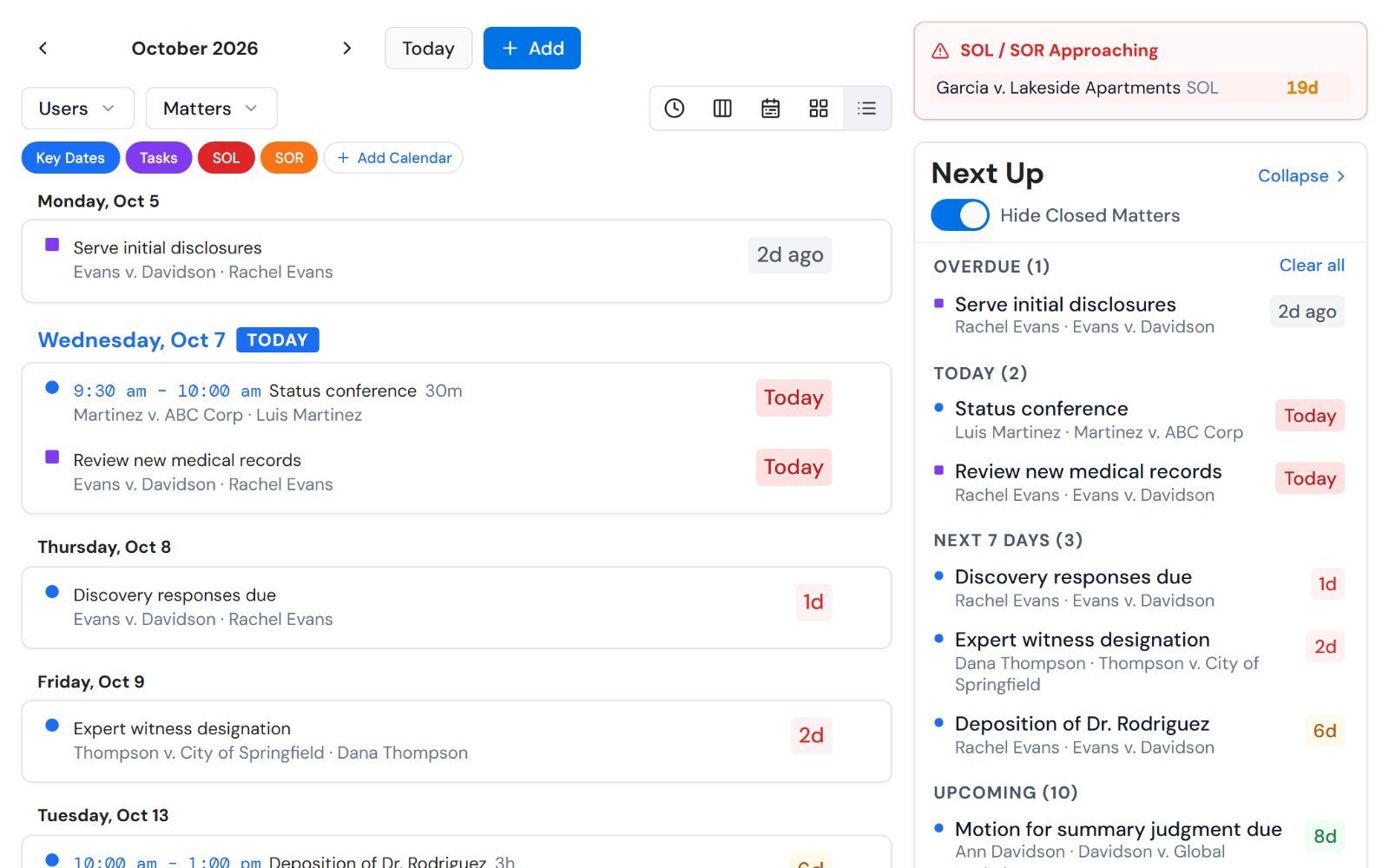
Calendar is the AI.Law tool civil litigators use for time, billing, and deadline management. Instead of opening every matter to check what's due, AI.Law delivers a daily morning briefing — an intelligent summary of today's deadlines, upcoming SOL dates, overdue tasks, and suggested next actions. Attorneys start every day with clarity instead of scrambling to figure out what's urgent.
On a live matter it runs in 4 steps: (1) Your calendar builds itself, (2) Set your preferences, (3) Start your day with a briefing, (4) Stay on top of everything. As you add matters and upload documents, AI.Law extracts key dates, tracks SOL deadlines, and populates your calendar automatically.
Most legal calendars are just blank grids where you manually type in dates. AI.Law's Calendar is fundamentally different — it reads your case data, extracts key dates from uploaded documents, tracks statutes of limitations with jurisdiction-specific rules, and monitors every task and deadline you've set. The result is a living calendar that grows with your cases and alerts you before anything is overdue. Key dates automatically extracted from uploaded documents — court orders, medical records, correspondence.
Daily morning briefing summarizes priority deadlines, upcoming dates, and overdue items. Agenda, day, week, and month views — switch instantly to see what matters right now.
What you get from Calendar
Every Calendar run is grounded in your uploaded matter — not a blank chat prompt. Here is what attorneys use on real cases:
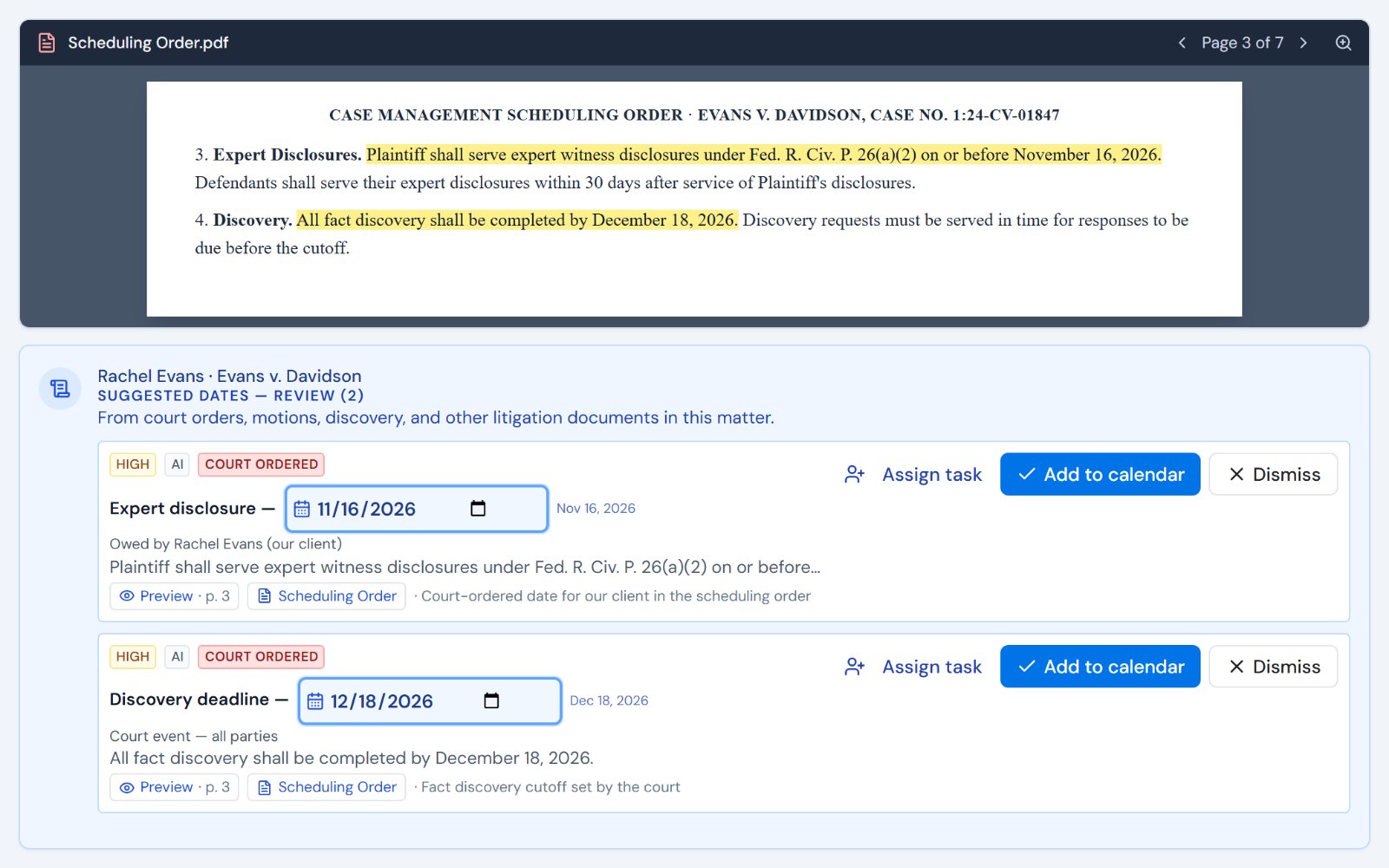
- Key dates automatically extracted from uploaded documents — court orders, medical records, correspondence
- Statute of limitations tracking with jurisdiction-specific rules and configurable warning periods
- Tasks, deadlines, and to-do items from every matter unified in one calendar
- AI-detected dates from document analysis surface automatically — no manual entry required
- Daily morning briefing summarizes priority deadlines, upcoming dates, and overdue items
- SOL warnings appear days and weeks in advance — not the day before filing
- Agenda, day, week, and month views — switch instantly to see what matters right now
- Filter by matter, event type, assigned attorney, or priority level
How It Works
Get started in minutes. No training required.
1. Your calendar builds itself
As you add matters and upload documents, AI.Law extracts key dates, tracks SOL deadlines, and populates your calendar automatically.
2. Set your preferences
Choose your default view, configure SOL warning periods, set notification preferences, and select which event types to display.
3. Start your day with a briefing
Each morning, AI.Law delivers a summary of your priority deadlines, upcoming dates, overdue tasks, and suggested next actions.
4. Stay on top of everything
Use filters to focus on one matter or see everything at once. Click any event to jump into the case with full context.
More Detail
A calendar that actually understands your practice
Most legal calendars are just blank grids where you manually type in dates. AI.Law's Calendar is fundamentally different — it reads your case data, extracts key dates from uploaded documents, tracks statutes of limitations with jurisdiction-specific rules, and monitors every task and deadline you've set. The result is a living calendar that grows with your cases and alerts you before anything is overdue.
- Key dates automatically extracted from uploaded documents — court orders, medical records, correspondence
- Statute of limitations tracking with jurisdiction-specific rules and configurable warning periods
- Tasks, deadlines, and to-do items from every matter unified in one calendar
- AI-detected dates from document analysis surface automatically — no manual entry required
- Color-coded event types let you instantly distinguish hearings, filing deadlines, SOL dates, and tasks
Faster
Morning briefing delivers your entire day in 60 seconds
Instead of opening every matter to check what's due, AI.Law delivers a daily morning briefing — an intelligent summary of today's deadlines, upcoming SOL dates, overdue tasks, and suggested next actions. Attorneys start every day with clarity instead of scrambling to figure out what's urgent.
- Daily morning briefing summarizes priority deadlines, upcoming dates, and overdue items
- SOL warnings appear days and weeks in advance — not the day before filing
- Suggested next actions based on case stage, upcoming dates, and open tasks
- Cross-matter visibility means you never miss a conflict or double-booking
Easier
One calendar for every matter, every date, every task
Lawyers typically juggle separate systems for court deadlines, firm tasks, personal calendars, and case milestones. AI.Law unifies everything in one calendar with flexible views — agenda, day, week, and month — so you can see your entire practice at a glance or drill into a single matter. Filter by matter, event type, attorney, or priority to find exactly what you need.
- Agenda, day, week, and month views — switch instantly to see what matters right now
- Filter by matter, event type, assigned attorney, or priority level
- Click any event to jump directly into the matter with full context
- Add new events, deadlines, or tasks from any view with smart defaults from the matter data
More Money
Never miss a deadline — and never miss revenue
A missed statute of limitations is malpractice. A missed filing deadline means sanctions. A forgotten follow-up means lost settlement leverage. AI.Law's Calendar protects your practice by ensuring every critical date is tracked, visible, and escalated when it's approaching. When nothing falls through the cracks, cases resolve faster, clients stay happier, and your firm earns more.
- SOL tracking with multi-tier warnings prevents the most catastrophic calendar failures
- Proactive deadline visibility means cases keep moving — no stalled matters sitting idle
- Morning briefings keep every attorney focused on revenue-generating work from the start of the day
- Confident deadline management reduces malpractice risk and insurance costs
Stop managing deadlines from memory and spreadsheets
See what changes when AI handles the work instead.
| Area | The Old Way | With AI.Law |
|---|---|---|
| Date entry | Manually type every deadline into a separate calendar tool | Dates automatically extracted from documents and case data — calendar builds itself |
| SOL tracking | Attorney calculates and manually sets a reminder | Jurisdiction-specific SOL rules applied automatically with multi-tier warnings |
| Daily planning | Open each matter to check what's due today | AI Morning Briefing delivers your entire day with priority rankings and next actions |
| Cross-matter visibility | Separate calendars, spreadsheets, or sticky notes per case | One unified calendar across all matters with filters for any view you need |
| Missed deadlines | Discovered when it's too late — potential malpractice | Escalating alerts days and weeks in advance — nothing slips through |
Related tools for Calendar
Same matter file, same uploads — keep working in this litigation workflow cluster.
- Auto-populate court deadlines from case documents — Deadline Tracking
- Add calculated SOL dates with escalating warnings — SOL Calculator
- Receive proactive scheduling suggestions from AI — Calendaring Suggestions
Browse all Billing tools on the features hub, or see all features.
Free practice management. Pay only for AI you use.
Run your firm on Free Forever at $0 — CRM, calendar, billing, and document management for everyone. Add paid AI seats only for the people who need them, all on one plan for your firm: Core, Litigator, or Advanced.
- 11 tools free forever — no credit card required
- One plan for your firm — every paid seat on the same plan
- Cancel any paid seat anytime — no lock-in
- Annual billing: 12 months for the price of 11 on paid seats
- Free Forever practice management stays at $0
SOC 2 Type II Certified · Patented Technology · No AI Training on Your Data · You Own Your Data
Explore More
Statute of limitations — calculated with tolling, discovery rules, and notice requirements
Enter the incident date, jurisdiction, and claim type. AI.Law calculates the filing deadline with the discovery rule, minority tolling, mental incapacity tolling, government tort claims act notice periods, and borrowing statutes applied. Results cite the applicable statutes. Deadlines sync to your calendar with 90/60/30/7-day warnings.
Get started with Calendar
Open a free practice management account, or build an AI plan when you’re ready.
No credit card required.
Need a firm or enterprise plan? Talk to our team