Rule 16 scheduling orders, discovery cutoffs, expert disclosures, and SOL — every litigation deadline tracked with court-specific templates
Track every deadline that matters in litigation: statute of limitations with jurisdiction-specific tolling, Rule 16 scheduling order dates, Rule 26(a) initial disclosure deadlines, Rule 26(f) conference dates, discovery cutoffs, expert disclosure and rebuttal deadlines, dispositive motion deadlines, pretrial conference dates, and trial dates. Apply court-specific templates that auto-calculate dates from your filing date or scheduling order. SOL displayed prominently on every matter with 90/60/30/7-day escalating warnings.
Included in Free Forever — practice management at $0. Add paid AI seats when you need them. See pricing
Open Your Free Plan · Book a Demo
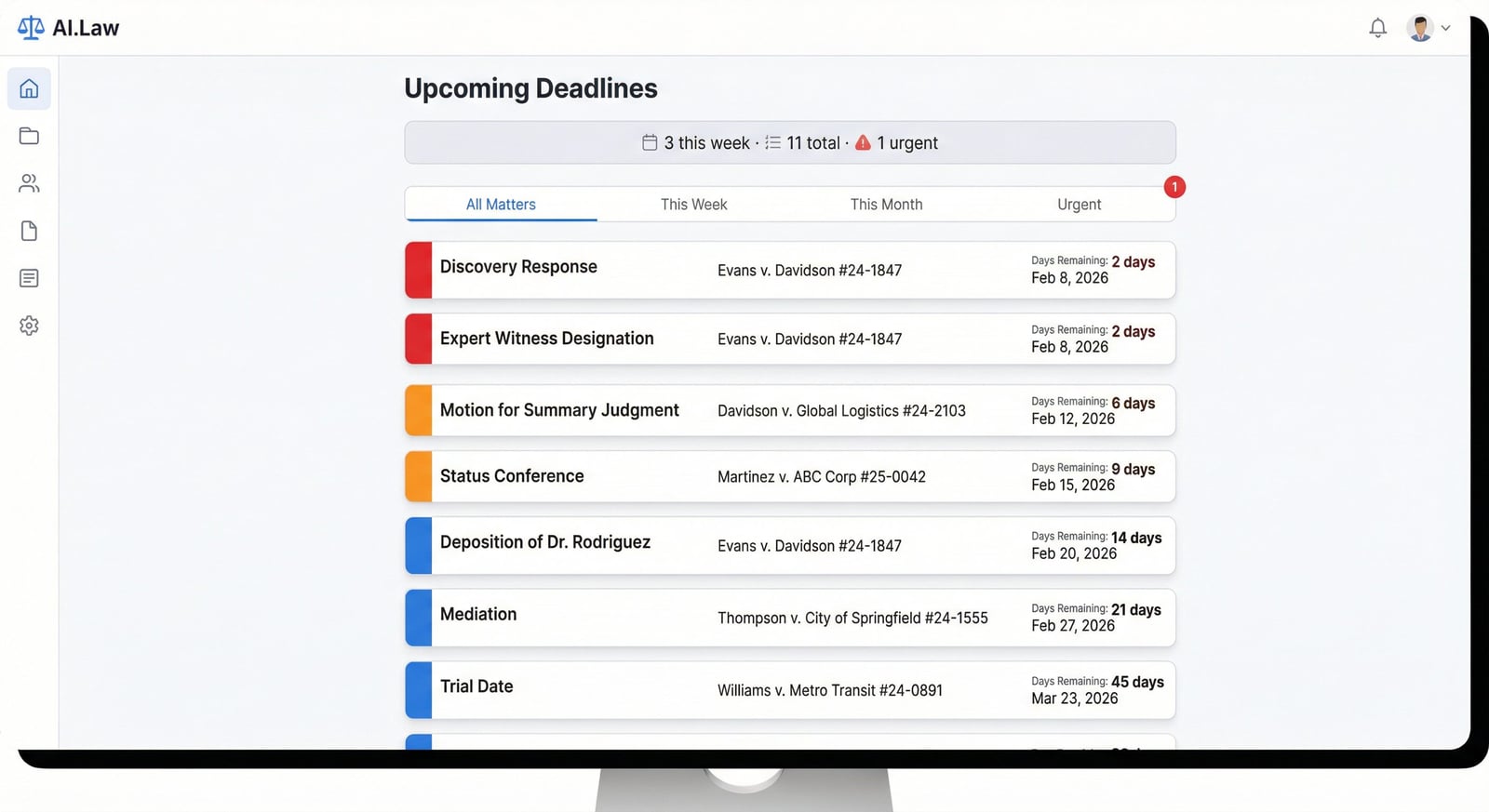
How Deadline Tracking works on a live matter
Deadline Tracking is the AI.Law tool civil litigators use for time, billing, and deadline management. The judge issues a Rule 16 scheduling order: fact discovery closes August 15, expert disclosures due September 15, expert rebuttal due October 15, dispositive motions due November 15, pretrial conference December 1, trial January 15. You enter these dates into AI.Law once. The template automatically calculates your internal deadlines: fact discovery requests must be served by July 15 (30 days before cutoff), expert reports need to be in hand by September 1 (two weeks before disclosure), and dispositive motion drafts need to be reviewed by November 1. One entry. Every deadline tracked. No mental math. No missed windows.
On a live matter it runs in 4 steps: (1) Apply a court template, (2) Add responsive and custom deadlines, (3) Monitor the dashboard, (4) Track completion and stay ahead. Select a template for your court and case type — federal, state, or custom. Enter the filing date or scheduling order dates. Every downstream deadline auto-calculates with local rule compliance.
Litigation runs on deadlines, and every court has different ones. Federal court cases need Rule 26(f) conference dates, Rule 26(a)(1) initial disclosure deadlines, discovery cutoffs, expert disclosure deadlines, expert rebuttal deadlines, dispositive motion deadlines, pretrial conference dates, and trial dates — all triggered from the Rule 16 scheduling order. State courts have their own variations. AI.Law’s deadline templates are built court by court: enter your filing date or scheduling order dates and every downstream deadline is calculated automatically. The statute of limitations is displayed prominently on every single matter — a persistent, undismissable banner that makes it impossible to overlook the most catastrophic deadline in litigation.
What you get from Deadline Tracking
Every Deadline Tracking run is grounded in your uploaded matter — not a blank chat prompt. Here is what attorneys use on real cases:
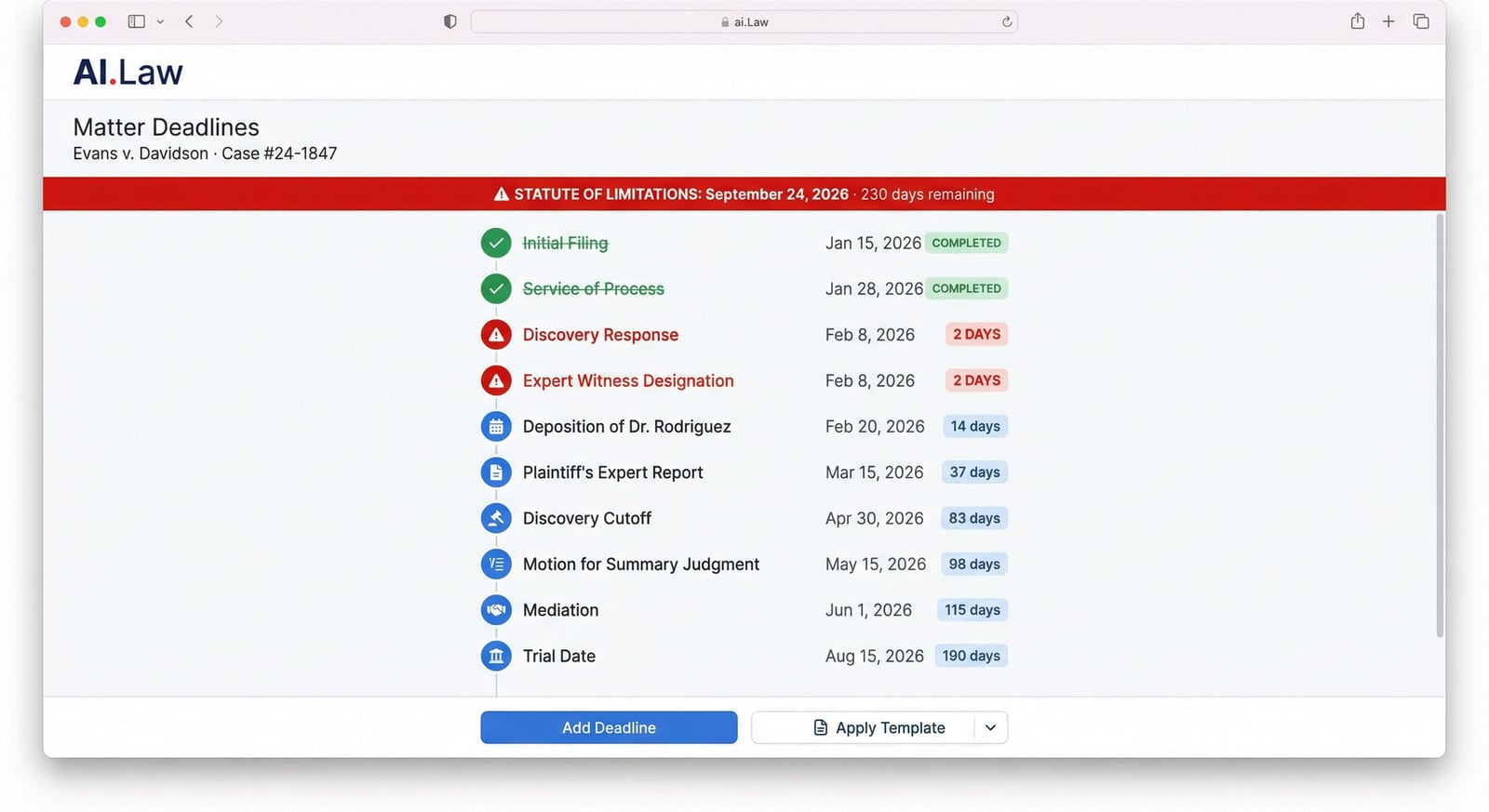
- Statute of limitations displayed as a persistent, prominent banner on every matter — not a calendar entry that can be dismissed or scrolled past, but an ever-present reminder with escalating color changes as the deadline approaches
- Court-specific templates with every litigation deadline: Rule 26(f) conference, initial disclosures, fact discovery cutoff, expert disclosure, expert rebuttal, dispositive motion deadline, pretrial conference, trial date — auto-calculated from filing date or scheduling order
- Responsive deadline tracking: when a motion is filed, add the response deadline (21 days under FRCP), reply deadline (14 days), and hearing date — triggered from the filing date with court-specific rules for computation
- Color-coded urgency system: red for overdue and imminent deadlines, orange for this-week items, blue for upcoming dates — visible on both the cross-matter dashboard and per-matter timeline
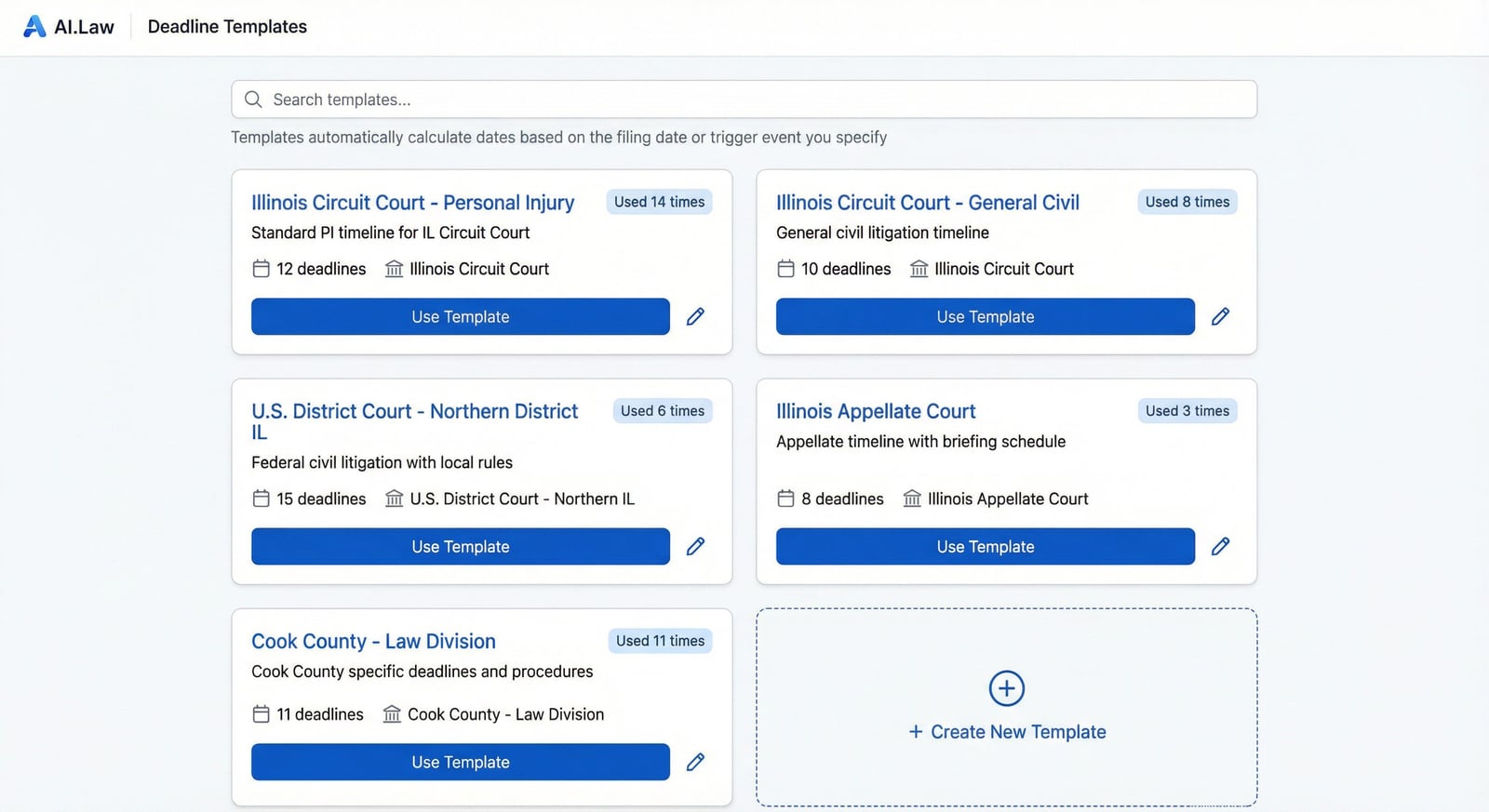
- Apply a court-specific template with one click — every Rule 16 deadline pre-configured for your specific court with local rule variations accounted for
- Internal deadlines auto-calculated: draft-due dates, service dates, and internal review windows set automatically based on the external deadlines — never miss a window because you didn’t back-calculate correctly
- Cross-matter dashboard with filter tabs: All, Today, This Week, This Month, Urgent, Overdue — see exactly what needs attention right now across your entire caseload
- Per-matter timeline showing every deadline from filing through trial — completed items checked off, upcoming items with days remaining, overdue items flagged in red
How It Works
Get started in minutes. No training required.
1. Apply a court template
Select a template for your court and case type — federal, state, or custom. Enter the filing date or scheduling order dates. Every downstream deadline auto-calculates with local rule compliance.
2. Add responsive and custom deadlines
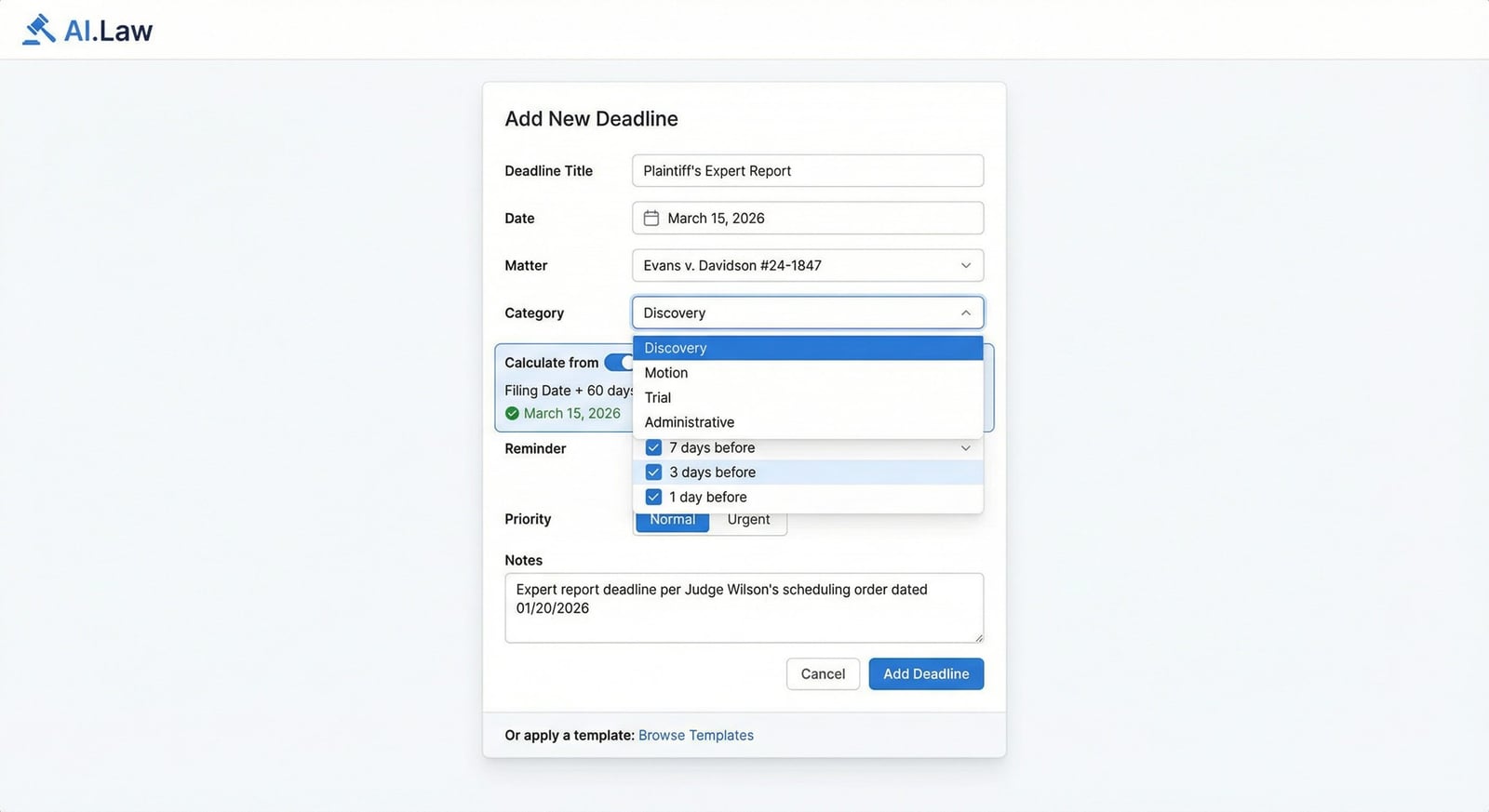
Add motion response deadlines (21/14-day FRCP), hearing dates, deposition dates, and any case-specific deadlines. Each auto-calculates with court holiday adjustments.
3. Monitor the dashboard
See every deadline across every matter on a single dashboard — color-coded by urgency, filterable by court, attorney, matter, or deadline type. SOL banners appear persistently on every matter.
4. Track completion and stay ahead
Mark deadlines complete as they pass. Internal warning dates fire before external deadlines so you’re never scrambling. The matter timeline shows your full litigation history from filing through trial.
More Detail
Rule 16 scheduling order deadlines, Rule 26 disclosure dates, discovery cutoffs, and expert deadlines — templated by court and auto-calculated
Litigation runs on deadlines, and every court has different ones. Federal court cases need Rule 26(f) conference dates, Rule 26(a)(1) initial disclosure deadlines, discovery cutoffs, expert disclosure deadlines, expert rebuttal deadlines, dispositive motion deadlines, pretrial conference dates, and trial dates — all triggered from the Rule 16 scheduling order. State courts have their own variations. AI.Law’s deadline templates are built court by court: enter your filing date or scheduling order dates and every downstream deadline is calculated automatically. The statute of limitations is displayed prominently on every single matter — a persistent, undismissable banner that makes it impossible to overlook the most catastrophic deadline in litigation.
- Statute of limitations displayed as a persistent, prominent banner on every matter — not a calendar entry that can be dismissed or scrolled past, but an ever-present reminder with escalating color changes as the deadline approaches
- Court-specific templates with every litigation deadline: Rule 26(f) conference, initial disclosures, fact discovery cutoff, expert disclosure, expert rebuttal, dispositive motion deadline, pretrial conference, trial date — auto-calculated from filing date or scheduling order
- Responsive deadline tracking: when a motion is filed, add the response deadline (21 days under FRCP), reply deadline (14 days), and hearing date — triggered from the filing date with court-specific rules for computation
- Color-coded urgency system: red for overdue and imminent deadlines, orange for this-week items, blue for upcoming dates — visible on both the cross-matter dashboard and per-matter timeline
Faster
Enter the scheduling order dates once — every downstream deadline calculates automatically
The judge issues a Rule 16 scheduling order: fact discovery closes August 15, expert disclosures due September 15, expert rebuttal due October 15, dispositive motions due November 15, pretrial conference December 1, trial January 15. You enter these dates into AI.Law once. The template automatically calculates your internal deadlines: fact discovery requests must be served by July 15 (30 days before cutoff), expert reports need to be in hand by September 1 (two weeks before disclosure), and dispositive motion drafts need to be reviewed by November 1. One entry. Every deadline tracked. No mental math. No missed windows.
- Apply a court-specific template with one click — every Rule 16 deadline pre-configured for your specific court with local rule variations accounted for
- Internal deadlines auto-calculated: draft-due dates, service dates, and internal review windows set automatically based on the external deadlines — never miss a window because you didn’t back-calculate correctly
- Responsive deadlines added in seconds: motion filed → response due in 21 days → reply in 14 → hearing date — calculated automatically with court holiday adjustments
- Cross-matter dashboard shows every deadline across every case in your practice — one screen tells you everything that’s due today, this week, and this month
Easier
One dashboard for every matter, every deadline type, every urgency level — filterable and actionable
Litigators juggle dozens of matters with hundreds of deadlines across multiple courts. AI.Law’s deadline dashboard puts them all in one view — filterable by urgency, court, case type, attorney, or specific matter. Per-matter timelines show every deadline from filing through trial in chronological order with completion status. Notes on each deadline capture scheduling order details, judge preferences (“Judge Williams requires motions by noon”), and any extensions granted. Build your own templates for courts you practice in regularly and apply them with one click on every new case.
- Cross-matter dashboard with filter tabs: All, Today, This Week, This Month, Urgent, Overdue — see exactly what needs attention right now across your entire caseload
- Per-matter timeline showing every deadline from filing through trial — completed items checked off, upcoming items with days remaining, overdue items flagged in red
- Build custom templates for your specific courts: Cook County Circuit Court, Northern District of Illinois, Franklin County Common Pleas — save once, apply to every new case in that court
- Notes and context on every deadline: scheduling order number, judge’s specific requirements, extensions granted, related motion filings — the context you need when the deadline approaches
More Money
A missed discovery cutoff means sanctions. A missed SOL means malpractice. AI.Law makes both impossible.
The number-one source of legal malpractice claims is missed deadlines — specifically, missed statutes of limitations. But it’s not just SOLs: a missed discovery cutoff can result in sanctions and excluded evidence. A missed expert disclosure deadline means your expert can’t testify. A missed dispositive motion deadline means you can’t file your summary judgment. Each of these failures costs your client and your firm. AI.Law’s systematic deadline tracking with escalating warnings, persistent SOL displays, and auto-calculated court-specific templates eliminates the human error that causes these failures.
- Eliminate the #1 cause of legal malpractice claims — missed filing deadlines — through persistent, escalating SOL tracking that’s impossible to overlook
- Expert disclosure deadlines tracked against retention timelines — AI.Law warns you when expert retention is running behind the disclosure deadline, not the day before the deadline passes
- Cases that hit every deadline move through the system faster — no delays from missed cutoffs, no sanctions hearings, no emergency motions for extensions
- Court-specific templates reduce case setup time by 15–20 minutes per new matter — that’s 2–3 hours per month on 10 new cases, redirected to billable work
Stop tracking litigation deadlines in Outlook reminders and spreadsheets
See what changes when AI handles the work instead.
| Area | The Old Way | With AI.Law |
|---|---|---|
| SOL tracking | Calendar reminder that can be snoozed, dismissed, or missed entirely | Persistent, undismissable banner on every matter with 90/60/30/7-day escalating color-coded warnings |
| Scheduling orders | Manually enter each date from the Rule 16 order into separate calendar entries | Court-specific templates auto-calculate every downstream deadline from scheduling order dates — one entry, all deadlines set |
| Response deadlines | Manually count 21 days and add a calendar entry — hoping you computed correctly | Enter the motion filing date — response, reply, and hearing deadlines auto-calculate with court holiday adjustments |
| Cross-case view | Open each matter individually to check what’s due — or rely on memory | Single dashboard showing every deadline across every matter with urgency filters and days-remaining counts |
| Malpractice prevention | Depends entirely on individual attorney diligence and manual tracking consistency | Systematic tracking with escalating warnings, internal pre-deadlines, and persistent SOL displays — structural protection against human error |
Related tools for Deadline Tracking
Same matter file, same uploads — keep working in this litigation workflow cluster.
- Calculate SOL deadlines with tolling and government notice rules — SOL Calculator
- Sync court deadlines to your unified firm calendar — Calendar
- Get AI-suggested prep windows before key deadlines — Calendaring Suggestions
Browse all Billing tools on the features hub, or see all features.
Free practice management. Pay only for AI you use.
Run your firm on Free Forever at $0 — CRM, calendar, billing, and document management for everyone. Add paid AI seats only for the people who need them, all on one plan for your firm: Core, Litigator, or Advanced.
- 11 tools free forever — no credit card required
- One plan for your firm — every paid seat on the same plan
- Cancel any paid seat anytime — no lock-in
- Annual billing: 12 months for the price of 11 on paid seats
- Free Forever practice management stays at $0
SOC 2 Type II Certified · Patented Technology · No AI Training on Your Data · You Own Your Data
Explore More
AI-powered legal calendar that knows your cases
AI.Law automatically surfaces every deadline, statute of limitations, hearing date, and task across all your matters — then delivers a daily morning briefing so nothing falls through the cracks. Stop manually tracking dates and start trusting a calendar built on the data already in your cases.
Get started with Deadline Tracking
Open a free practice management account, or build an AI plan when you’re ready.
No credit card required.
Need a firm or enterprise plan? Talk to our team