AI-drafted status update emails that keep clients informed
AI.Law drafts professional client update emails based on the actual activity in the matter — new filings, discovery deadlines, deposition schedules, and case milestones. One click to review, one click to send. No more "I'll get back to you" on a Friday afternoon.
Included in Free Forever — practice management at $0. Add paid AI seats when you need them. See pricing
How Client Update Emails works on a live matter
Client Update Emails is the AI.Law tool civil litigators use for client communication. Writing a client update email means opening the matter, reviewing what happened, translating it into client-friendly language, and typing the email. It takes 15–30 minutes per client — and when you have 50 active matters, it never happens. AI.Law drafts the update from the actual case activity in seconds. You review and send.
On a live matter it runs in 4 steps: (1) Set your update schedule, (2) AI drafts from case activity, (3) Review in batch, (4) Send from your email. Choose a cadence — weekly, biweekly, or monthly — for client updates. Apply to all matters or specific ones.
Your client wants to know what happened this month. AI.Law reads the actual activity in the matter — filings, discovery exchanges, deposition scheduling, deadline changes, new documents — and drafts a professional update email that tells the client exactly what happened, what is coming next, and what they need to do. Not a template. A real update based on what actually happened in their case. Updates drafted from actual matter activity — filings, discovery, depositions, motions, deadlines.
AI drafts the update from actual case activity — you review and click send. Automated schedule: weekly, biweekly, or monthly — AI drafts updates on your cadence.
What you get from Client Update Emails
Every Client Update Emails run is grounded in your uploaded matter — not a blank chat prompt. Here is what attorneys use on real cases:
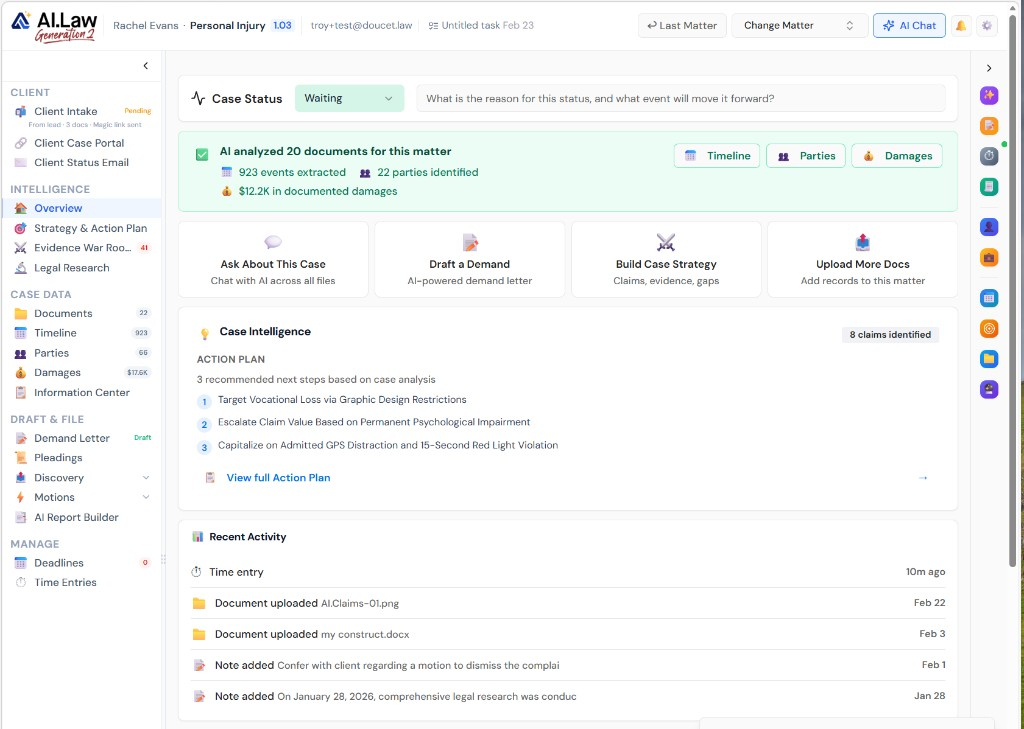
- Updates drafted from actual matter activity — filings, discovery, depositions, motions, deadlines
- Client-appropriate language: professional, clear, and free of legal jargon that confuses clients
- Action items highlighted when the client needs to do something — send documents, attend a deposition, review a settlement offer
- Scheduled updates: set a cadence (weekly, biweekly, monthly) and AI.Law drafts the update on schedule
- AI drafts the update from actual case activity — you review and click send
- Updates for all active matters generated in batch — review 50 client updates in 30 minutes
- Automated schedule: weekly, biweekly, or monthly — AI drafts updates on your cadence
- Batch review: all client updates presented together for efficient review and sending
How It Works
Get started in minutes. No training required.
1. Set your update schedule
Choose a cadence — weekly, biweekly, or monthly — for client updates. Apply to all matters or specific ones.
2. AI drafts from case activity
AI reads the actual activity in each matter — filings, discovery, depositions, motions, deadlines — and drafts a professional update in client-appropriate language.
3. Review in batch
All pending client updates presented together. Review each one, make edits, and approve for sending.
4. Send from your email
Updates sent from your email address — clients see communication from their attorney, with your firm branding.
More Detail
Status updates drafted from actual case activity — not generic templates
Your client wants to know what happened this month. AI.Law reads the actual activity in the matter — filings, discovery exchanges, deposition scheduling, deadline changes, new documents — and drafts a professional update email that tells the client exactly what happened, what is coming next, and what they need to do. Not a template. A real update based on what actually happened in their case.
- Updates drafted from actual matter activity — filings, discovery, depositions, motions, deadlines
- Client-appropriate language: professional, clear, and free of legal jargon that confuses clients
- Action items highlighted when the client needs to do something — send documents, attend a deposition, review a settlement offer
- Scheduled updates: set a cadence (weekly, biweekly, monthly) and AI.Law drafts the update on schedule
Faster
Draft, review, and send client updates in 2 minutes — not 30
Writing a client update email means opening the matter, reviewing what happened, translating it into client-friendly language, and typing the email. It takes 15–30 minutes per client — and when you have 50 active matters, it never happens. AI.Law drafts the update from the actual case activity in seconds. You review and send.
- AI drafts the update from actual case activity — you review and click send
- Updates for all active matters generated in batch — review 50 client updates in 30 minutes
- Scheduled cadence means updates go out consistently — not just when the client calls to complain
- Include or exclude specific activities from the update with one click
Easier
Set it on a schedule — AI drafts, you review, clients stay informed
Set a monthly update schedule for your active matters. On the first of each month, AI.Law drafts a professional update email for every client based on the actual activity in their case. Review them in batch, make any edits, and send. Consistent client communication without the time drain.
- Automated schedule: weekly, biweekly, or monthly — AI drafts updates on your cadence
- Batch review: all client updates presented together for efficient review and sending
- Customizable tone: professional, warm, formal, casual — match your firm's client communication style
- Sent from your email — clients see communication from their attorney, not from software
More Money
Informed clients stay. Uninformed clients leave. Updates are free on AI.Law.
The number-one complaint clients have about their attorneys is lack of communication. Attorneys know this but do not have time to write 50 update emails per month. AI.Law eliminates the bottleneck — drafting professional updates from actual case activity so your clients feel informed, valued, and confident in your representation.
- Consistent communication is the #1 driver of client satisfaction and referrals
- Clients who feel informed do not call for status updates — reducing staff phone time
- Professional update emails demonstrate the value of your work to clients — supporting fee justification
- Free on every AI.Law plan — client communication should never be deprioritized due to time constraints
Stop choosing between client communication and billable work
See what changes when AI handles the work instead.
| Area | The Old Way | With AI.Law |
|---|---|---|
| Drafting | 15–30 minutes per client update email | AI-drafted from actual case activity in seconds — review and send in 2 minutes |
| Consistency | Updates happen when you have time — which is never | Scheduled cadence ensures every client gets regular updates |
| Content | Generic "things are moving along" with no specifics | Specific updates based on actual filings, discovery, depositions, and deadlines |
| Volume | 50 active matters = 50 emails you do not have time to write | Batch-generated and batch-reviewed — 50 updates in 30 minutes |
| Client satisfaction | Clients call to ask what is happening because they never hear from you | Proactive updates keep clients informed — fewer status-inquiry calls |
Related tools for Client Update Emails
Same matter file, same uploads — keep working in this litigation workflow cluster.
- Schedule automatic matter-specific status updates — Automatic Client Updates
- Give clients a branded portal alongside email updates — Client Portal
- Email clients a link to plain-language discovery help — Client Discovery Help
Browse all Client Communication tools on the features hub, or see all features.
Free practice management. Pay only for AI you use.
Run your firm on Free Forever at $0 — CRM, calendar, billing, and document management for everyone. Add paid AI seats only for the people who need them, all on one plan for your firm: Core, Litigator, or Advanced.
- 11 tools free forever — no credit card required
- One plan for your firm — every paid seat on the same plan
- Cancel any paid seat anytime — no lock-in
- Annual billing: 12 months for the price of 11 on paid seats
- Free Forever practice management stays at $0
SOC 2 Type II Certified · Patented Technology · No AI Training on Your Data · You Own Your Data
Explore More
Clients answer discovery questions through a guided portal — AI translates legalese into language they understand
Send your client a guided discovery response portal where AI explains each discovery request in plain language, asks follow-up questions to gather complete answers, and collects the client’s responses in a structured format ready for attorney review. Reduce the hours you spend on the phone explaining what “identify all documents relating to” means.
Get started with Client Update Emails
Open a free practice management account, or build an AI plan when you’re ready.
No credit card required.
Need a firm or enterprise plan? Talk to our team