Every lead tracked from first call to signed retainer — with conflict checks built in
AI.Law's Lead CRM tracks every prospect through your intake pipeline — running conflict checks before you invest time, classifying case type and estimated value at first contact, and converting to an active matter with one click when the retainer is signed. No leads lost in a spreadsheet. No conflicts discovered after you've already done the intake.
Included in Free Forever — practice management at $0. Add paid AI seats when you need them. See pricing
Open Your Free Plan · Book a Demo
How Lead CRM works on a live matter
Lead CRM is the AI.Law tool civil litigators use for intake, lead tracking, and conflict screening. A prospect calls at 4:45 PM on a Friday about a slip-and-fall at a grocery store. Your intake coordinator enters the name, opposing party, and incident details. AI.Law runs a conflict check in seconds, classifies the case as premises liability, and your coordinator sends an AI-delivered intake link — all before the prospect hangs up. When the client signs the retainer Monday morning, one click converts the lead to an active matter with every data point carrying forward. No re-entry. No separate conflict check system. No sticky note that gets lost over the weekend.
On a live matter it runs in 4 steps: (1) Enter the prospect, (2) Send AI-delivered intake, (3) Track through your pipeline, (4) Convert to active matter. Intake coordinator enters the caller’s name, opposing party, case type, and lead source. AI.Law runs a conflict check against every client and adverse party in the system — instantly.
A new lead calls about a rear-end collision. Before your intake coordinator spends 30 minutes on the phone, you need to know three things: is there a conflict, what's the case type, and where did this lead come from? AI.Law answers all three at the point of entry. Conflict checks run against every existing client and adverse party in your system. Case type classification (MVA, premises liability, workers’ comp, medical malpractice, product liability) determines which intake template to send. And lead source tracking — Google LSAs, TV spots, referral attorney, website form — tells you which marketing spend is actually producing signed cases. Automatic conflict checks against all existing clients, adverse parties, and related entities before you invest intake time — flag potential conflicts before the first conversation.
What your Lead CRM dashboard shows you
AI.Law's Lead CRM gives you firm-wide visibility into your intake pipeline — not a spreadsheet that three people edit simultaneously and nobody trusts.
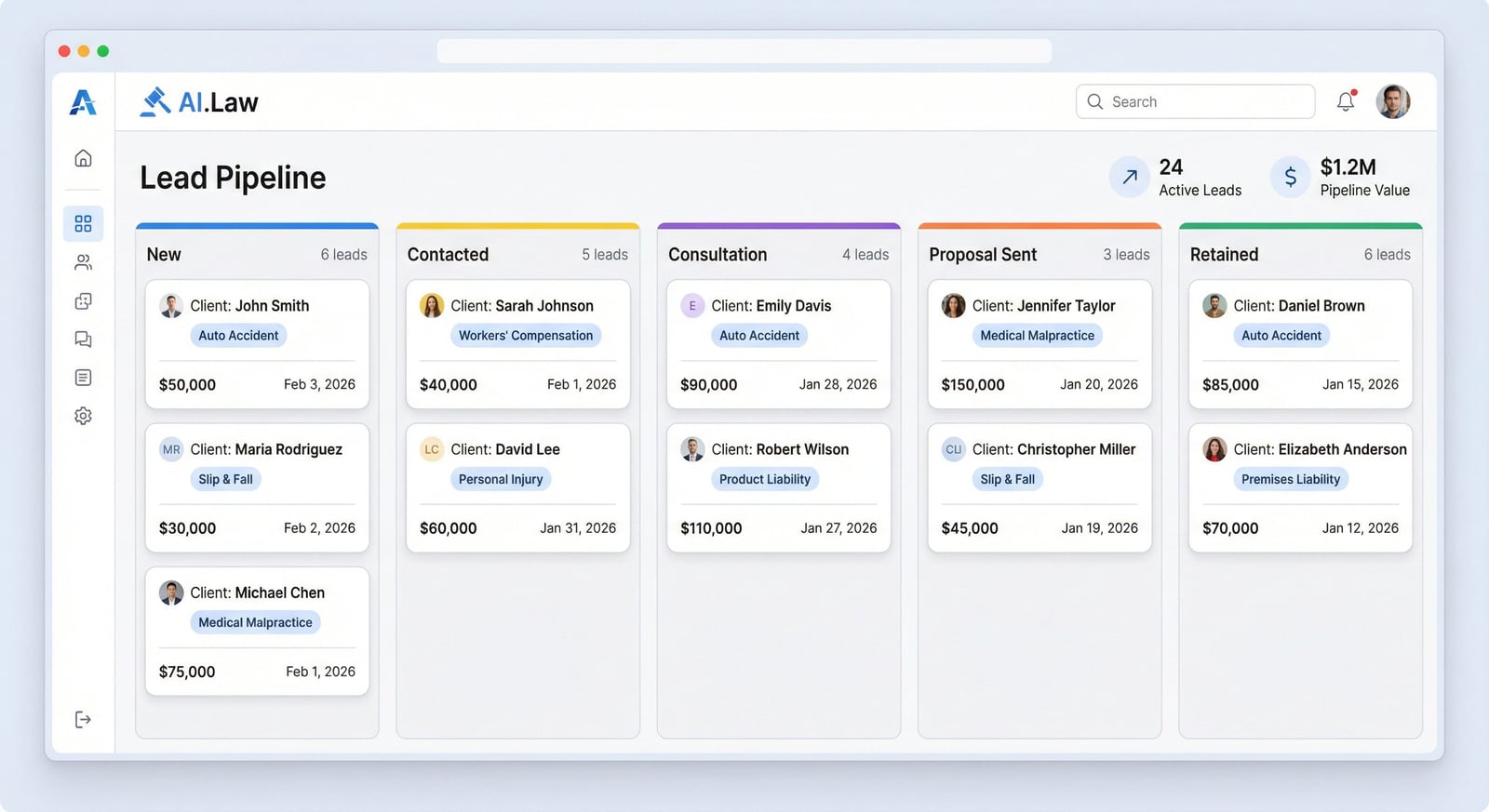
- Visual pipeline with customizable stages: New, Intake Sent, Consultation Scheduled, Retainer Sent, Retained, Declined
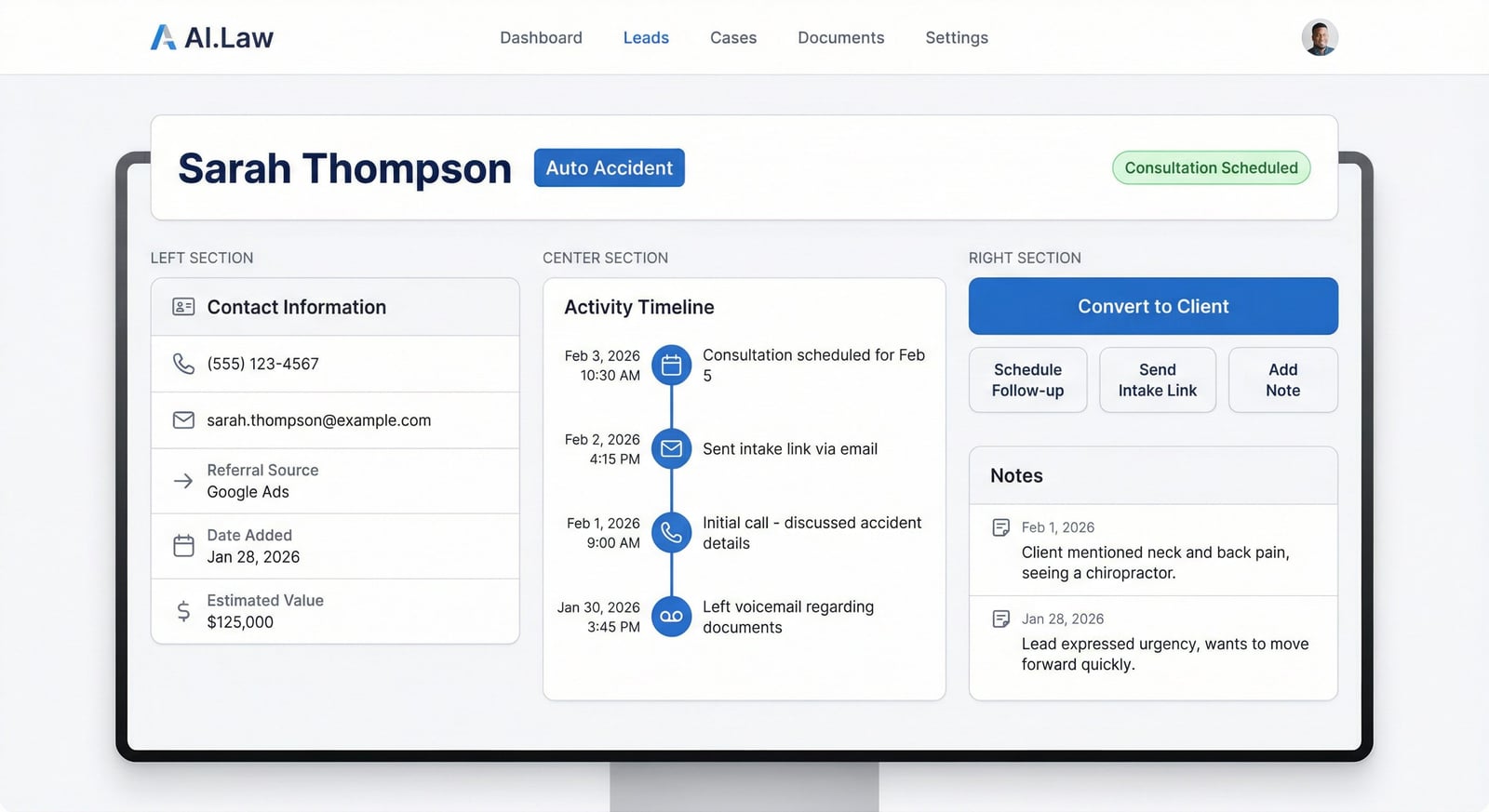
- Lead cards showing contact info, case type, estimated value, lead source, and days in current stage
- Automatic conflict check results displayed on every lead before intake begins
- Source attribution tracking: Google LSAs, TV, referral attorney, website form, walk-in, or custom sources
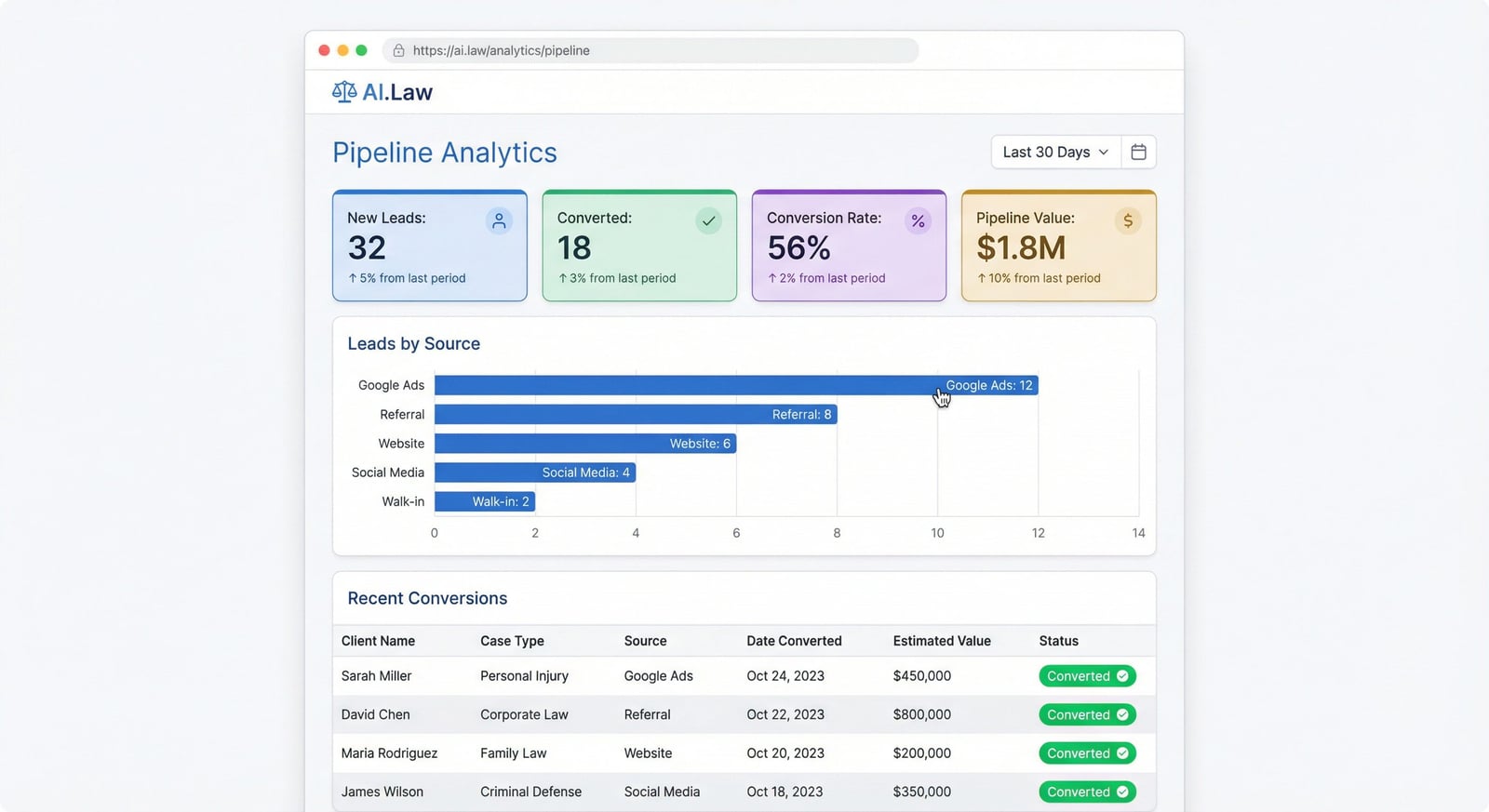
- Conversion analytics: leads by source, conversion rate by case type, average case value by source
- Pipeline value: total estimated value of active leads at each stage based on historical conversion rates
- Follow-up reminders with configurable triggers — leads that haven't moved stages in 48 hours get flagged
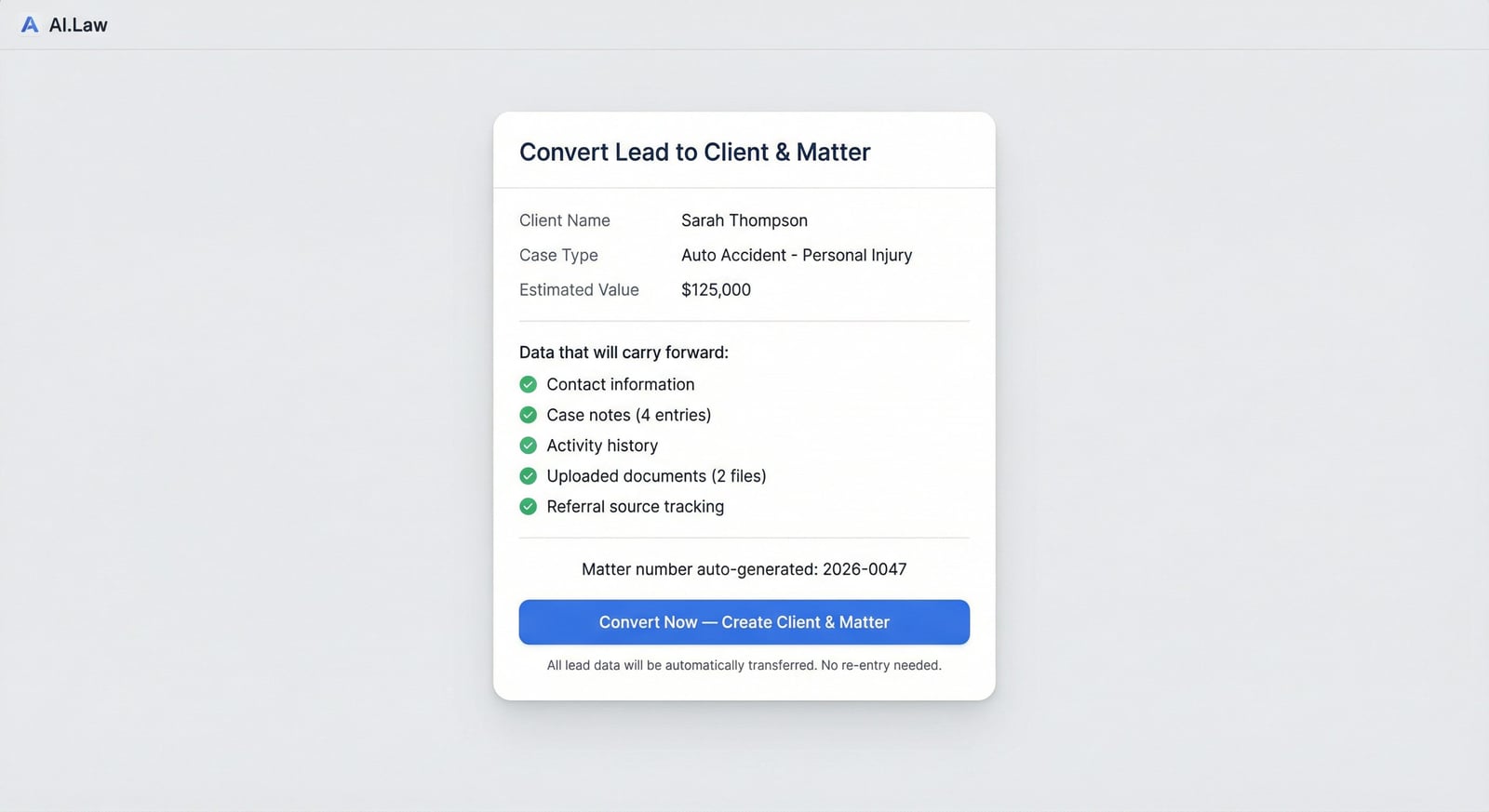
- One-click lead-to-matter conversion that carries every data point forward into the active case
How It Works
Get started in minutes. No training required.
1. Enter the prospect
Intake coordinator enters the caller’s name, opposing party, case type, and lead source. AI.Law runs a conflict check against every client and adverse party in the system — instantly.
2. Send AI-delivered intake
If the conflict check is clear, send an AI-powered intake link with one click. The prospect answers questions in their own words on their own time — gathering richer detail than a phone call.
3. Track through your pipeline
Move leads through your customized stages: new, intake sent, consultation scheduled, retainer sent, retained. Every interaction is logged. Follow-up reminders keep leads from going cold.
4. Convert to active matter
One click converts the lead to a client and matter. Every data point — contact info, case type, lead source, intake responses, conflict check, notes — carries forward. Start working the case immediately.
How attorneys use Lead CRM
Real scenarios from litigation practice — not hypotheticals.
High-volume PI firm managing 100+ leads per month
Your firm runs Google LSAs, a television campaign, and a referral network that collectively generate 120-150 new leads per month. Three intake coordinators field calls, but without a centralized system, leads fall through the cracks — the Friday afternoon call that nobody follows up on Monday, the referral from a colleague that sits in someone's email for a week. With AI.Law's Lead CRM, every lead is entered once and tracked through a visual pipeline. Each coordinator sees the same dashboard. Follow-up reminders fire automatically. And at the end of the month, you can see exactly how many leads came in, how many converted to signed cases, and which marketing channels produced them.
Solo practitioner tracking referral sources
You're a solo PI attorney and most of your cases come from three sources: a handful of referring attorneys, your Google Business Profile, and word of mouth from former clients. You need to know which relationships are producing cases so you know where to invest your time. AI.Law's Lead CRM tracks the source of every lead. At the end of the quarter, you can see that Attorney Garcia referred 8 leads (4 signed, averaging $62K in case value) while your Google profile generated 22 leads (3 signed, averaging $28K). That data changes how you spend your next Saturday — at a referral lunch with Garcia, not optimizing your Google listing.
Catching conflicts before investing intake time
A new prospect calls about a car accident. Your intake coordinator enters the caller's name and the name of the other driver. Before anyone spends 30 minutes gathering details, AI.Law's conflict check runs instantly against every client, adverse party, and related entity in your system. It flags that the other driver is a current client in an unrelated workers' comp matter. You know immediately — before the intake call, before the consultation, before anyone has invested time in a case you cannot ethically take. The prospect gets a prompt referral to another attorney, and you've protected both your existing client relationship and your ethical obligations.
More Detail
Conflict checks, case classification, and source attribution — before you invest a minute of attorney time
A new lead calls about a rear-end collision. Before your intake coordinator spends 30 minutes on the phone, you need to know three things: is there a conflict, what's the case type, and where did this lead come from? AI.Law answers all three at the point of entry. Conflict checks run against every existing client and adverse party in your system. Case type classification (MVA, premises liability, workers’ comp, medical malpractice, product liability) determines which intake template to send. And lead source tracking — Google LSAs, TV spots, referral attorney, website form — tells you which marketing spend is actually producing signed cases.
- Automatic conflict checks against all existing clients, adverse parties, and related entities before you invest intake time — flag potential conflicts before the first conversation
- Case type classification at lead entry — MVA, slip-and-fall, dog bite, medical malpractice, employment, workers’ comp — routes to the correct intake workflow and fee structure
- Lead source tracking tied to signed cases and case values — know that your Google LSAs produce a 14% conversion rate on MVA cases averaging $47K, while TV spots produce 6% at $32K
- Estimated case value captured at first contact — track your pipeline value against historical conversion rates to forecast revenue with real data, not gut feeling
Faster
New lead to conflict-cleared, intake-sent, active matter — in under 2 minutes
A prospect calls at 4:45 PM on a Friday about a slip-and-fall at a grocery store. Your intake coordinator enters the name, opposing party, and incident details. AI.Law runs a conflict check in seconds, classifies the case as premises liability, and your coordinator sends an AI-delivered intake link — all before the prospect hangs up. When the client signs the retainer Monday morning, one click converts the lead to an active matter with every data point carrying forward. No re-entry. No separate conflict check system. No sticky note that gets lost over the weekend.
- Conflict check runs at lead entry — not after you have already invested intake time and attorney review in a case you cannot take
- One-click intake link sends your AI-delivered intake to the prospect immediately — they start answering questions on their own time, on their own phone
- Lead-to-matter conversion carries forward every data point: contact info, case type, lead source, notes, conflict check results, and estimated value
- Pipeline dashboard shows every active lead across the firm — how many are waiting for intake, how many have consultations scheduled, how many are ready for retainer
Easier
Your intake team sees the full pipeline — not a spreadsheet with 47 tabs
Most firms track leads in a shared spreadsheet, a generic CRM that doesn’t understand legal workflows, or the intake coordinator’s memory. AI.Law’s pipeline is built for how law firms actually sign cases: lead entry with conflict check, case type classification, intake sent, consultation scheduled, retainer sent, retained. Every stage is visible. Every lead has a complete history. And everything is connected to the platform where you’ll actually work the case.
- Visual pipeline with stages that match your actual intake workflow — customize stage names, add or remove stages, set follow-up triggers
- Complete prospect history: every call note, email, intake response, and document — attached to the lead record and carried forward to the matter
- Built directly into the platform where you manage cases — no separate CRM login, no data sync issues, no integration that breaks
- Firm-wide visibility means the managing partner knows how many leads came in this week, where they came from, and where they stand — without asking anyone
More Money
Know your cost-per-signed-case by source — and stop funding channels that don’t convert
You’re spending $8,000/month on Google LSAs, $12,000 on TV, $3,000 on a referral network, and $2,000 on your website. Which channel actually produces signed cases? Which ones produce the highest-value cases? Most firms cannot answer this because their lead tracking is disconnected from their case management. AI.Law connects the entire pipeline: lead source → lead → signed case → case value → resolution. When you can see that your $8K in LSA spend produced 12 signed MVA cases averaging $52K, but your $12K in TV spend produced 8 cases averaging $28K — you make better decisions about where your marketing dollars go.
- Lead source → signed case → case value tracking gives you a true cost-per-acquisition and ROI for every marketing channel
- Conversion rate by case type and source — know that your website converts med mal leads at 22% but MVA leads at only 9%, and optimize accordingly
- Pipeline value forecasting based on historical conversion rates — see that your current pipeline represents $1.2M in projected signed cases
- Follow-up reminders ensure prospects don’t go cold — the lead who doesn’t hear back within 24 hours signs with the firm that calls them first
Stop tracking leads in spreadsheets and generic CRMs
See what changes when AI handles the work instead.
| Area | The Old Way | With AI.Law |
|---|---|---|
| Conflict checks | Run separately — sometimes after intake is already done | Automatic at lead entry — flag conflicts before investing any time |
| Lead tracking | Spreadsheets, sticky notes, or a CRM that doesn’t understand legal | Purpose-built pipeline with case type classification and source tracking |
| Conversion | Re-enter all client info from the CRM into your case management system | One-click conversion — every data point carries forward into the active matter |
| Marketing ROI | No connection between lead source and signed case value | Full attribution: lead source → signed case → case value → ROI by channel |
| Cost | $50–$300/month for a standalone CRM + per-seat licenses | Built into AI.Law — no extra cost, no extra login, no data sync |
From first call to active case — without re-entering a single data point
The Lead CRM is where every case begins. A prospect calls, your coordinator enters the basics, and the conflict check runs before you invest any time. If the lead looks viable, you send an AI-powered client intake link — the prospect answers detailed questions on their own phone, in their own time, in English or Spanish. Their responses feed directly into the lead record. When the retainer is signed, one click converts the lead to an active matter. Contact information, case type, lead source, intake responses, conflict check results, and every note your team logged — all of it carries forward. The document management system is ready for uploads. The case is live. No re-entry, no lost data, no "what did the client say on the phone last week?"
- Lead CRM (this tool) — Enter the prospect and run automatic conflict checks
- Conflict Checks — Screen against all existing clients and adverse parties
- Client Intake — Send AI-delivered intake — bilingual, narrative-driven, on the client's phone
- Document Management — Upload and organize case files once the matter is created
- Data Extraction — AI reads and indexes everything uploaded — providers, bills, timelines
Key concepts in legal intake and client acquisition
Understanding the legal framework behind the tool helps you get more from it.
Conflict of interest screening (Rules 1.7 & 1.9)
Model Rules of Professional Conduct 1.7 (current client conflicts) and 1.9 (former client conflicts) require attorneys to screen every prospective engagement for conflicts before forming an attorney-client relationship. A conflict check must cover not just the prospective client and opposing party, but related entities, corporate affiliates, and individuals associated with either side. Running this check at lead entry — before the intake call — prevents the costly scenario of investing hours in a case you cannot ethically take.
Duty to prospective clients (Rule 1.18)
Model Rule 1.18 creates duties to prospective clients even when no engagement results. If a prospective client discloses confidential information during an initial consultation, the attorney cannot later represent an adverse party in the same or a substantially related matter. This is why conflict checks must run before the intake conversation — once the prospect starts sharing details, you may have already created obligations that affect your ability to represent the other side.
Cost per acquisition and marketing ROI
For law firms, knowing your cost per signed case by marketing channel is the difference between informed growth and wasted spend. If Google LSAs cost $8,000/month and produce 12 signed cases (cost per acquisition: $667), while television costs $12,000/month and produces 4 signed cases (CPA: $3,000), the ROI calculation is clear — but only if you track the full pipeline from lead source through signed retainer. Most firms cannot make this calculation because their lead tracking is disconnected from their case management system.
Speed-to-contact and conversion rates
Studies consistently show that the first firm to respond to a legal inquiry has a dramatically higher conversion rate. A prospect who calls three firms will likely sign with the one that calls back first, sends intake materials promptly, and follows up within 24 hours. Automated pipeline tracking with follow-up reminders ensures that no lead sits unanswered over a weekend while the prospect signs with the firm that responded Saturday morning.
Related tools for Lead CRM
Same matter file, same uploads — keep working in this litigation workflow cluster.
- Send bilingual AI intake that captures richer detail than a phone call — Client Intake
- Screen new leads against every client and adverse party before intake — Conflict Checks
- Let AI interview prospects 24/7 in English or Spanish — Automated AI Intake
- Upload retainer documents once — every tool reads the same file — Document Management
- Turn a signed retainer into a court-ready complaint — Lawsuit Drafting
Browse all Intake & CRM tools on the features hub, or see all features.
Free practice management. Pay only for AI you use.
Run your firm on Free Forever at $0 — CRM, calendar, billing, and document management for everyone. Add paid AI seats only for the people who need them, all on one plan for your firm: Core, Litigator, or Advanced.
- 11 tools free forever — no credit card required
- One plan for your firm — every paid seat on the same plan
- Cancel any paid seat anytime — no lock-in
- Annual billing: 12 months for the price of 11 on paid seats
- Free Forever practice management stays at $0
SOC 2 Type II Certified · Patented Technology · No AI Training on Your Data · You Own Your Data
Explore More
Free AI Intake for Law Firms
AI interviews your clients in English or Spanish — gathering richer detail than a 60-minute phone call. Free forever. No credit card. No contracts. No per-seat fees.
Get started with Lead CRM
Open a free practice management account, or build an AI plan when you’re ready.
No credit card required.
Need a firm or enterprise plan? Talk to our team