Search everything across every matter instantly — AI-powered cross-case intelligence
Workdrive is an advanced AI search engine built on retrieval-augmented generation (RAG) that uses multiple search methods to find anything across all your matters in seconds — documents, extracted data, client narratives, timelines, medical records, and more. One search bar. Every case. Instant answers with cited sources.
Included in Free Forever — practice management at $0. Add paid AI seats when you need them. See pricing
Open Your Free Plan · Book a Demo
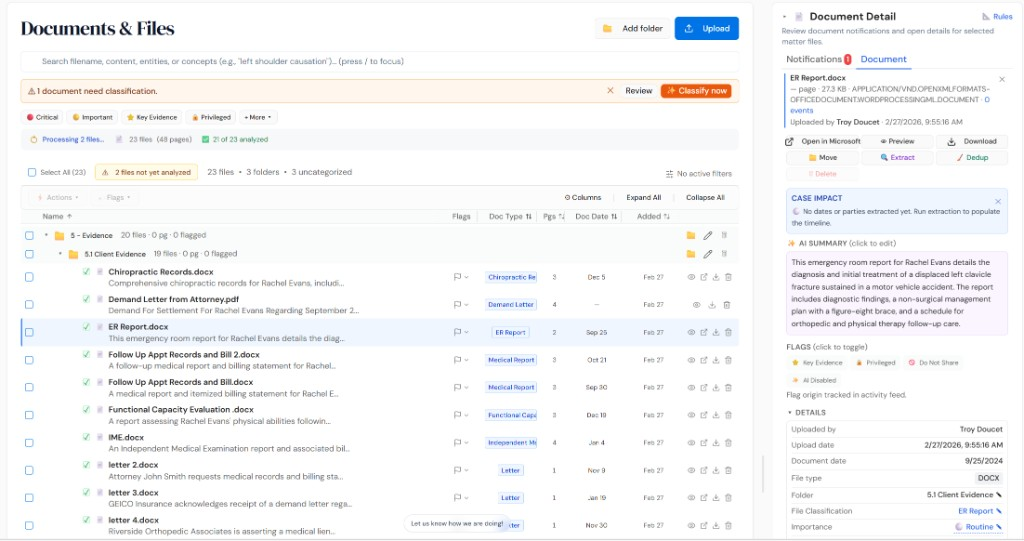
How Workdrive works on a live matter
Workdrive is the AI.Law tool civil litigators use for document, research, and case-strategy work. Without Workdrive, finding a specific fact, document, or precedent means opening matters one by one, searching each individually, and hoping you remember which case had the information you need. Workdrive eliminates all of that. Type your question or search term once and get AI-ranked results from every matter in your firm — instantly. What used to take hours of hunting through files now takes seconds.
On a live matter it runs in 4 steps: (1) Everything indexes automatically, (2) Search with natural language, (3) Review AI-ranked results, (4) Click through to the source. Every document you upload, every client intake narrative, every extracted timeline and medical record — all automatically indexed by Workdrive's advanced RAG system. No setup, no configuration, no extra steps.
Most legal search tools only search filenames or basic metadata. Workdrive uses advanced retrieval-augmented generation (RAG) with multiple search methods — semantic understanding, keyword matching, and hybrid retrieval — to find information buried deep inside documents, extracted timelines, medical records, client intake narratives, billing data, and case notes across every matter in your firm. It doesn't just search text — it understands what you're looking for and finds the most relevant results even when the exact words don't match. Every result includes clickable citations to the source document so verification is one click away. Advanced RAG with multiple retrieval methods — semantic search that understands meaning, keyword matching for exact terms, and hybrid search that combines both for maximum recall.
Single search queries all matters simultaneously — no opening cases one by one to look for information. Natural language search — ask questions the way you would ask a colleague and get intelligent, ranked results.
What you get from Workdrive
Every Workdrive run is grounded in your uploaded matter — not a blank chat prompt. Here is what attorneys use on real cases:
- Advanced RAG with multiple retrieval methods — semantic search that understands meaning, keyword matching for exact terms, and hybrid search that combines both for maximum recall
- Searches across all matters simultaneously — documents, extracted timelines, parties, medical records, client intake narratives, billing data, notes, and case strategy
- AI-ranked results with relevance scoring that surfaces the most important matches first, no matter which matter they live in
- Every result includes clickable citations to the exact source document and highlighted passage — verification is one click away
- Single search queries all matters simultaneously — no opening cases one by one to look for information
- Results returned in seconds even across hundreds of matters and thousands of documents
- Natural language search — ask questions the way you would ask a colleague and get intelligent, ranked results
- No special syntax, Boolean operators, or advanced search training required — anyone at the firm can use it immediately
How It Works
Get started in minutes. No training required.
1. Everything indexes automatically
Every document you upload, every client intake narrative, every extracted timeline and medical record — all automatically indexed by Workdrive's advanced RAG system. No setup, no configuration, no extra steps.
2. Search with natural language
Type any question or search term into the Workdrive search bar. Use natural language, keywords, or a combination — the AI understands what you're looking for and searches across every matter.
3. Review AI-ranked results
Get results ranked by relevance with document previews, highlighted matching passages, and clickable citations to the source. Filter by matter, document type, date, or category.
4. Click through to the source
Click any result to jump directly to the source document in the original matter — with the matching passage highlighted. Verify, use, or share the information instantly.

More Detail
Advanced RAG technology that searches deeper than any legal search tool on the market
Most legal search tools only search filenames or basic metadata. Workdrive uses advanced retrieval-augmented generation (RAG) with multiple search methods — semantic understanding, keyword matching, and hybrid retrieval — to find information buried deep inside documents, extracted timelines, medical records, client intake narratives, billing data, and case notes across every matter in your firm. It doesn't just search text — it understands what you're looking for and finds the most relevant results even when the exact words don't match. Every result includes clickable citations to the source document so verification is one click away.
- Advanced RAG with multiple retrieval methods — semantic search that understands meaning, keyword matching for exact terms, and hybrid search that combines both for maximum recall
- Searches across all matters simultaneously — documents, extracted timelines, parties, medical records, client intake narratives, billing data, notes, and case strategy
- AI-ranked results with relevance scoring that surfaces the most important matches first, no matter which matter they live in
- Every result includes clickable citations to the exact source document and highlighted passage — verification is one click away
Faster
Find anything across your entire firm in seconds — not hours of searching through individual cases
Without Workdrive, finding a specific fact, document, or precedent means opening matters one by one, searching each individually, and hoping you remember which case had the information you need. Workdrive eliminates all of that. Type your question or search term once and get AI-ranked results from every matter in your firm — instantly. What used to take hours of hunting through files now takes seconds.
- Single search queries all matters simultaneously — no opening cases one by one to look for information
- Results returned in seconds even across hundreds of matters and thousands of documents
- AI pre-indexes all uploaded documents, extracted data, and client narratives for near-instant retrieval
- Find prior case research, medical experts, treatment patterns, and settlement precedents across your entire case history in moments

Easier
One search bar for everything — no special syntax, no matter which case it lives in
Workdrive is designed so that anyone at your firm can find anything without training. Type a natural language question like "which cases involved lumbar fusion surgery" or "find all matters where the client reported sleep problems" and Workdrive returns AI-ranked results with previews and citations. No Boolean operators, no special search syntax, no remembering which matter to look in — just type what you need and get answers.
- Natural language search — ask questions the way you would ask a colleague and get intelligent, ranked results
- No special syntax, Boolean operators, or advanced search training required — anyone at the firm can use it immediately
- Filter results by matter, document type, date range, or extracted data category when you want to narrow down
- Results include document previews with highlighted matching passages so you can evaluate relevance without opening every file
More Money
Cross-case intelligence turns your entire case history into a competitive advantage that wins more and settles higher
Every case your firm has ever handled contains valuable intelligence — medical experts who testified favorably, treatment patterns that support higher damages, defense arguments you successfully countered, and settlement ranges for similar injuries. Without Workdrive, that knowledge is trapped inside individual matters. With Workdrive, your entire case history becomes a searchable knowledge base that makes every new case stronger. Find the expert who helped you win last time. See how you argued a similar injury before. Know what similar cases settled for. That cross-case intelligence translates directly into better case strategy, more effective settlement correspondence, and higher settlement values.
- Find prior cases with similar injuries, defendants, or legal theories to build stronger arguments and more persuasive settlement correspondence
- Identify medical experts, treating physicians, and defense experts from prior cases — know who helped and who to avoid
- Search settlement and verdict history across your firm to set accurate case values and negotiate from a position of knowledge
- Reduce duplicate research by finding prior legal research, motions, and case strategy from similar matters — stop reinventing the wheel on every case

Workdrive vs. searching cases one at a time
See what changes when AI handles the work instead.
| Area | The Old Way | With AI.Law |
|---|---|---|
| Search scope | Open each matter individually and search within that case only | One search across all matters — documents, extracted data, intake narratives, timelines, and more |
| Search intelligence | Basic keyword or filename search that misses synonyms and context | Advanced RAG with semantic understanding, keyword matching, and hybrid retrieval for maximum recall |
| Finding prior cases | Rely on memory to remember which cases had similar facts or experts | Search your entire case history — similar injuries, experts, defense arguments, and settlement data |
| Result quality | Long lists of files with no ranking or context preview | AI-ranked results with relevance scores, document previews, and highlighted matching passages |
| Verification | Download and open files manually to check if they contain what you need | Clickable citations jump directly to the highlighted source passage in the original document |
| Cross-case intelligence | Valuable knowledge from prior cases trapped and inaccessible | Every case your firm has handled becomes searchable intelligence that strengthens new cases |
Related tools for Workdrive
Same matter file, same uploads — keep working in this litigation workflow cluster.
- Search semantically across all firm matters with RAG — Cross-Matter Intelligence
- Run firmwide full-text reconnaissance on indexed files — Firmwide Document Reconnaissance
- Manage matter files with AI classification at upload — Document Management
Browse all Admin tools on the features hub, or see all features.
Free practice management. Pay only for AI you use.
Run your firm on Free Forever at $0 — CRM, calendar, billing, and document management for everyone. Add paid AI seats only for the people who need them, all on one plan for your firm: Core, Litigator, or Advanced.
- 11 tools free forever — no credit card required
- One plan for your firm — every paid seat on the same plan
- Cancel any paid seat anytime — no lock-in
- Annual billing: 12 months for the price of 11 on paid seats
- Free Forever practice management stays at $0
SOC 2 Type II Certified · Patented Technology · No AI Training on Your Data · You Own Your Data
Explore More
Search every document across every matter in your firm — AI finds patterns, precedents, and connections that no single attorney remembers
AI.Law’s Cross-Matter Intelligence uses retrieval-augmented generation (RAG) to search across every document in every matter your firm has ever handled — finding similar fact patterns, reusable work product, prior rulings, medical experts, and settlement precedents in seconds. Your firm’s institutional knowledge stops being trapped inside individual case files and becomes a searchable competitive advantage.
Get started with Workdrive
Open a free practice management account, or build an AI plan when you’re ready.
No credit card required.
Need a firm or enterprise plan? Talk to our team